
Start tasks from a chat page, browse artifacts as previews, and search files and chats from ⌘K
Start new tasks from a full chat page, browse artifacts as a gallery of previews, search file contents and past chats from the command palette, and use remote hosts without Developer mode.
Start a task by typing your first message on a chat page, see your artifacts as previews grouped by project, find a file or an old conversation from ⌘K, and connect remote hosts without turning on Developer mode.
Start tasks from a chat page
New task now opens a full chat page instead of a dialog. Pick the project, agent, model, and effort under the composer, then type your first message; the session starts when you send, and the page becomes that session's chat. In a project, once its workspace is ready, you can mention files with @ and attach images and files before sending, and / offers the skills the agent listed in your earlier sessions. The Chat or Terminal choice for each task is gone: new sessions use your Default session interface from Settings › General. Cloud projects still use the New Task dialog. #6733
Start a task from the new chat page: pick the effort, mention data/prs.csv with @, and send. The page becomes the session's chat while Codex works.In the preview build, you can paste, drop, or pick images and files on the new chat page right away, including in Scratchpad. They're sent with your first message and are lost if the page reloads before you send. #7313
Browse artifacts as previews
The Artifacts page is now a gallery of previews grouped by project, with Recent and Pinned sections, a compact list view, and a project or Scratchpad filter. Click an artifact to preview it, then choose Open in session to go to the session that made it. You can pin, reveal, copy, and delete an artifact without opening its session; deleting asks for confirmation first. A session's Artifacts tab uses the same preview cards, and HTML artifacts open in the artifact viewer instead of the Browser. #7098 #7101 #7102
Pin a report, sort a CSV preview by area, open a Mermaid diagram, then jump to the session that made it.PDF, CSV and TSV, and Mermaid files now preview instead of showing raw text or a binary-file notice. PDFs show their pages, CSV and TSV files show as a table you can sort by column, and Mermaid files render as diagrams. You can select text in a PDF or table to leave feedback for the agent. PDFs also preview in Files. PDFs from Cloud sessions don't preview yet. #7278
Agents are now told to save only finished work as artifacts and to keep drafts, frames, downloads, and logs out of the list. If Claude Code tries its own Artifact tool, whose output Orchestrator can't show, Orchestrator points it to the session's artifact folder instead. #7162
Search files and chats from ⌘K
The command palette now searches the contents of your session's files and your chats on this computer. Press Enter to open a file at the matching line or a chat scrolled to the matching message. Settings and shortcuts are searchable too, by related words and with small typos, so "dark mode" finds Theme and "toggle sidbar" finds Toggle sidebar. #7185
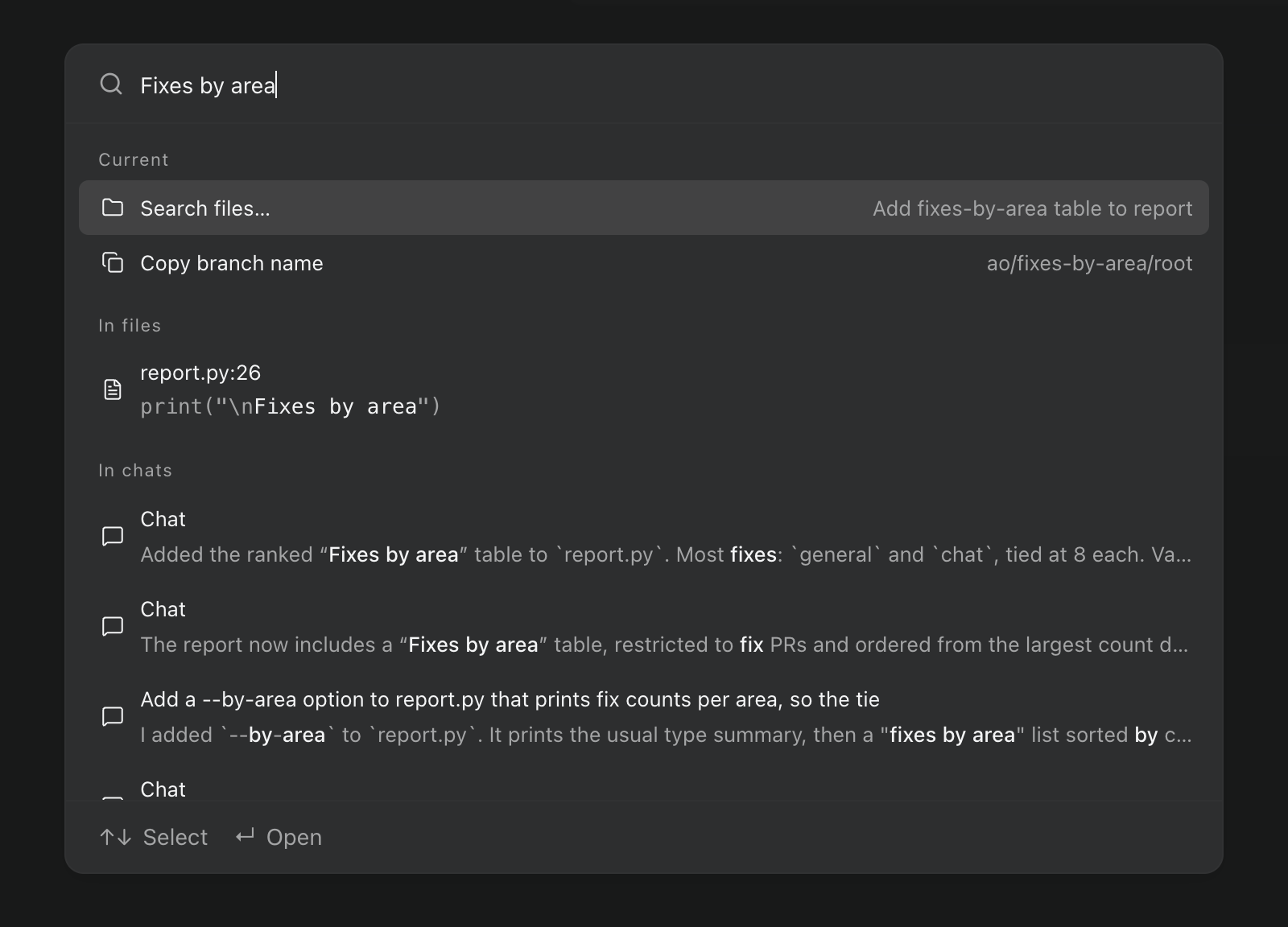 The ⌘K palette searching for Fixes by area, with a match in report.py at line 26 and matches in three chats.
In the preview build, the palette also has a new layout. Results stay on screen while you type, with commands first and file and chat matches below them. Enter opens a session directly, and ⌘↵ shows its actions. #7244
Math in chat replies
Chat replies and Markdown previews can show LaTeX math. math code blocks always render; inline math such as $…$ is off by default, and you can turn it on with Render math in Settings › General. With it on, a price written with $ can show as math. #7251
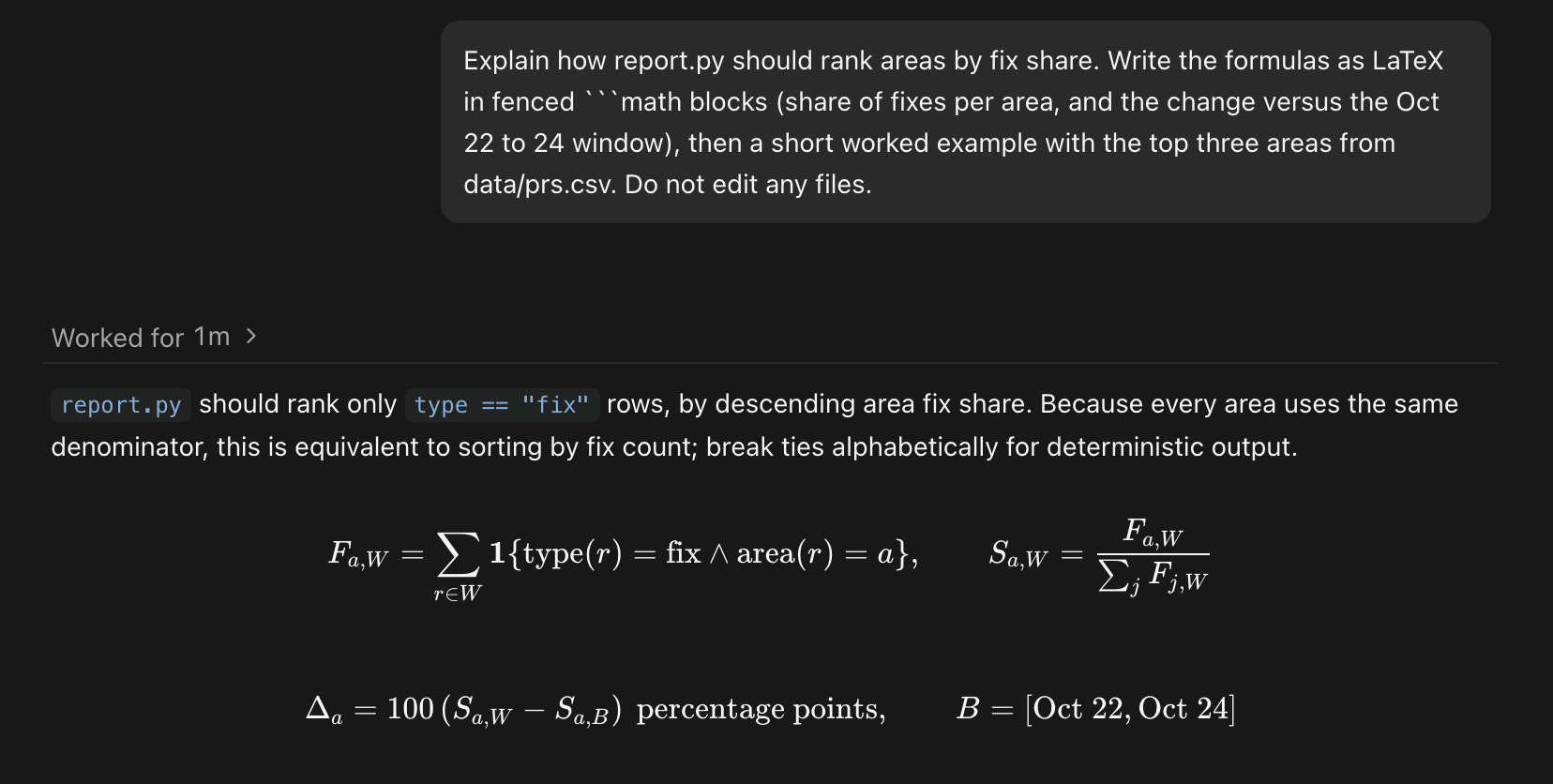 A Codex reply in chat with the fix-share formulas rendered from math code blocks.
Improvements
Chat
- In the preview build, messages you queue while an agent is working are delivered together, in order, when the turn ends or along with a steer. Each still appears on its own in the chat, and Retry on a failed turn resends everything that turn received, attachments included. #6504
- Messages Orchestrator sends to an agent for you now look like what they are. File comments, diff instructions, and Git button actions appear as your own messages, and GitHub updates appear as compact rows: failing checks link to their logs, review comments show the reviewer, file, and line, and merge conflicts get their own row. #7230
- In messages between agents, file paths open in Files and session IDs become links with a hover card. #7223
- When an agent asks you a question, the card lists numbered choices: press 1 to 9 to pick one, 0 to write your own answer under Other, and Enter to send. Cards with several questions show your progress and let you go back to an earlier one. #7117
- Long replies stream more smoothly and with much less CPU: finished parts aren't redrawn on every update, and code is highlighted as it arrives. #7226 #7231 #7287
- Claude Code chats start faster, and an idle chat stays ready for 90 seconds instead of 30, so a quick follow-up doesn't wait for the agent to restart. A Claude Code turn also ends as soon as the reply finishes; the context meter may update a moment later. #7218 #7305
- Chats open with whole turns, including the prompt that started them, and load earlier history as you scroll up. Going back to an unchanged chat on this computer no longer reloads it. #7165
- In the preview build, the permission and model menus in the composer stay in place as options change, and you can change model, effort, and Fast mode one after another without waiting for each to save. #7309
Agents and automations
- When you switch a session to another agent, the handoff note lists the session's artifacts, so the new agent continues your files instead of starting over. #7161
- Agent menus no longer show Auth unknown or Unverified badges. MiMo and Hermes connections through Z.AI show Connected only after Orchestrator checks the credentials with a one-token request, which can use a small amount of your plan's quota. #7118
- Automations can use a specific model and effort level for every scheduled run. Existing automations keep their current defaults. #7113
- In the preview build, when Orchestrator's reviewer submits a review on a pull request, its comments reach the working agent right away instead of waiting for Orchestrator's next scheduled sync with GitHub. #7060
- In the preview build,
ao session get <id> --transcript Nprints a Chat session's last N messages and activities. Use--beforeto page back and--capto limit long fields. It works for Chat sessions on this computer, not Terminal, Cloud, or remote-host sessions. #6501
Desktop app
- Settings › Remote hosts is now available to everyone, so you can run sessions on another machine without turning on Developer mode. The sidebar also shows Sign in to cloud, and your account and sign-out options, whenever sign-in is available. #7152
- You can swipe with two fingers to go back and forward between pages and Settings sections. It's off by default; turn on Navigation gestures in Settings › General. #6858
- Settings › Shortcuts is easier to scan, with commands grouped by category, a search and an All commands or Modified filter that stay at the top, and buttons to edit or remove a binding. The ⌘/ shortcut list uses the same look. #7196
- The agent update notice sits in the top-right of the main panel, combines several updates into one card, shows build dates instead of long version strings, and can be swiped away. #7268
- The notification drawer has clearer rows with consistent times and session details, and archived sessions show a restore link. #7200
- Menus, dialogs, and pickers now share one look, and Browser, Files, and Artifacts use the same Maximize and Return to panel controls. The session tab menu uses vertical dots, and moving off a theme in Settings no longer leaves its preview applied. #7202 #7199 #7219
- In the preview build, the Connect mobile panel in Settings shows the iOS and Android downloads as buttons you can hover to see each store's QR code, and says whether remote access is on or still starting. #7323
- In the preview build, the Browser panel presents a consistent Chromium identity, with a Chrome-style user agent, matching client hints, and a language header that matches the page's languages. #6876
Bug fixes
Chat
- Claude Code sessions can switch from Terminal to Chat again after you sent a message while Claude was busy. #6924
- When an agent asks several questions at once, the question panel stays inside the window and scrolls. #6975
- Claude Code chats keep their real task statuses when a turn ends, and the plan shows once, on the latest turn, instead of under every turn. #7173
- An expired agent login now shows one short notice with Log in again, which opens that agent's settings on the right machine, including a remote host. #7147
- The suggested next message comes back after you clear the composer; Escape still hides it. #7288
- In the preview build, a Claude Code chat that hits its usage limit keeps the Usage limit reached notice after it sleeps and wakes, and Auto-resume at reset runs instead of failing. #7293
- In the preview build, Claude's summary after compacting a long conversation no longer appears as a message from you. Summaries already shown stay in the chat. #7328
Orchestrators and sessions
- After you change a project's orchestrator agent and restart Orchestrator, the new agent resumes instead of stopping with The agent controller stopped. An orchestrator that already broke this way shows a readable error; change its agent again and restart to fix it. #7276 #7124 #7187
- Replacing a Terminal orchestrator while its branch is checked out in another worktree no longer shows Internal server error. #7245
- When Orchestrator can't relaunch an agent, it says which step failed instead of Internal server error. #7252
- A sleeping chat now gets notices about failing checks, reviews, or merge conflicts. They're queued while the agent wakes, messages you send meanwhile no longer fail with could not wake the agent, and other sessions' pull request updates keep flowing. #7209 #7197
- A pull request no longer shows twice in the session inspector after its repository is renamed or transferred. #7206
- If Cursor rejects the Fast setting you chose, the session fails to start with an error instead of quietly using Cursor's default. The FX warning about model lists only names connections you've set up. #7080 #6971
Desktop app
- In the preview build, reviews with thousands of changed files stay responsive. Files are shown 96 per page with Previous files and Next files, the total count is shown, and picking any file jumps to its page. #7290
- An artifact's Show in Finder (File Explorer on Windows) and Show in Terminal, the artifacts folder buttons, and a session's Open in menu work again. They stopped working in v0.14.6. #7271
- The Browser panel connects again after you restart the app while Orchestrator's background service keeps running. Before, it stayed unusable until the next launch. #6525
- In the preview build, when Orchestrator is attached to a background service it didn't start and that service stops, the unreachable notice appears right away. #5694
- A project you add, clone, or create now appears first in the sidebar and stays there after a restart. #7178
- On macOS, the sidebar resizes correctly after leaving full screen or changing zoom. With window transparency on, terminal backgrounds are transparent too. #7184 #7195
Learn more
Changes not marked as preview are in stable v0.14.7, released on October 28, which also brings the preview items from the October 22–24 update to stable. Preview items require the October 27 preview build.