Changelog

What's new

New workflows, meaningful improvements, and fixes you will notice. Updated weekly. For technical release notes and downloads, use the release archive.

Agent switching for everyone, worker updates in the orchestrator chat, and chats that reconnect on their own

Hand a session to another agent without Developer mode, follow workers from the orchestrator chat, get back to work sooner after a restart, and start tasks without waiting for a name.

Hand a session to a different agent halfway through, see what your workers are doing without leaving the orchestrator chat, pick up chats right after AO restarts, and start new tasks sooner.

Switch agents in the middle of a session

You can now hand a local session to a different coding agent without turning on Developer mode. In Chat, choose another agent from the model picker; it takes over on your next message with a handoff note summarizing the session so far. In a Terminal UI session, open the session tab's ⋯ menu, choose Agent, then Switch. Only agents that are installed and ready on your computer are offered, Chat lists only agents that support Chat, and you can switch only while the agent is idle, not mid-turn or while it waits for an approval or answer. Cloud sessions can't switch agents. #7126

Switch a chat from Codex to Claude Code in the model picker, and Claude Code picks up the conversation on your next message.

The redesigned model picker groups models by maker and adds an effort slider, fast and thinking toggles, and plan and fast mode for Codex and Claude Code. When you pick another agent, it shows the model and effort that agent will start with. Fast and plan mode reset when the agent restarts. The older switching tools are gone: the ao session switch-agent, ao session agent-switch ls, and ao session handoff submit commands and the old Switch agent dialog in Terminal have been removed. #6588 #7034
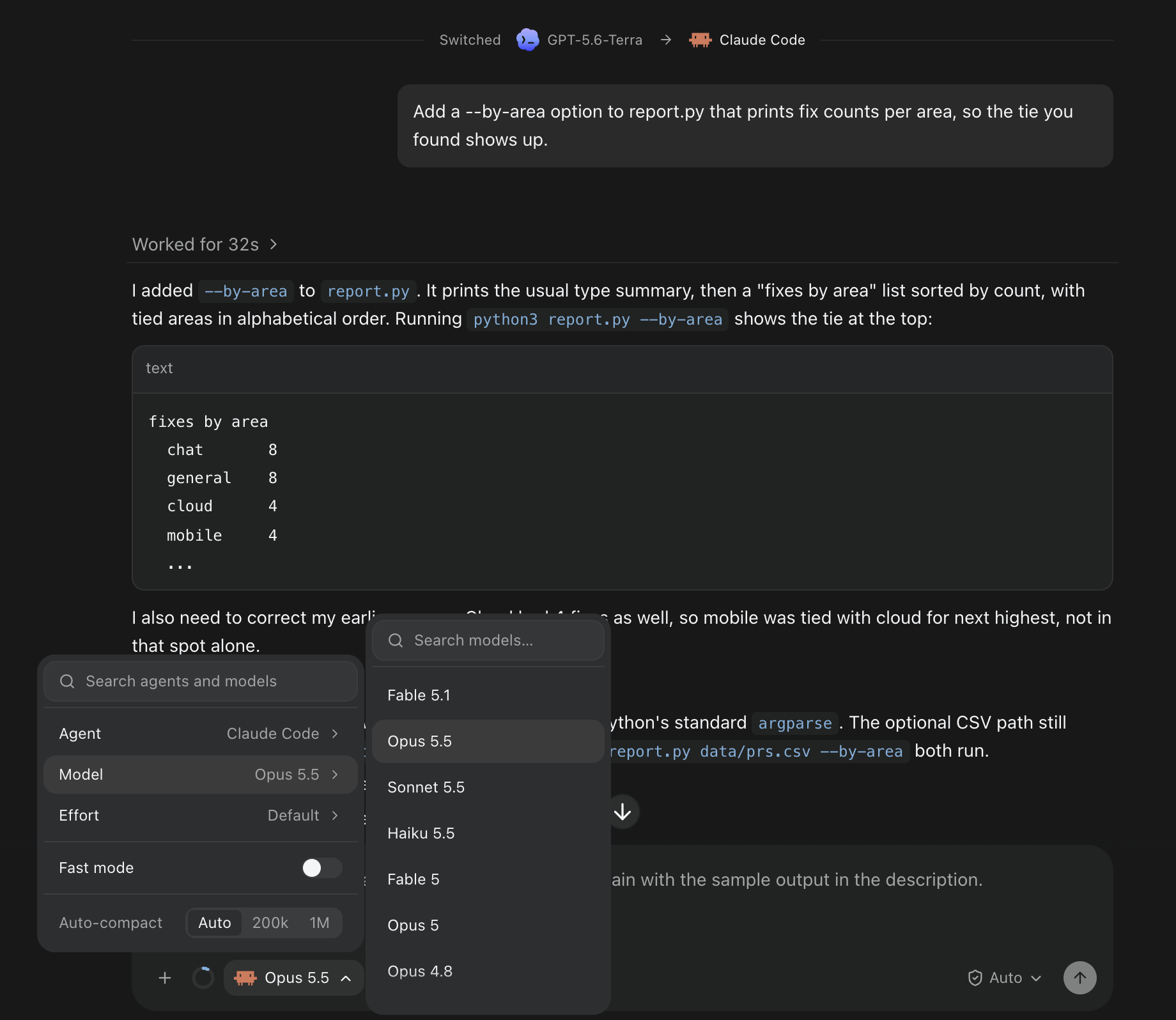
The model picker in a chat just switched from Codex to Claude Code, with Agent, Model, Effort and Fast mode, and Claude Code's models listed.The model picker in a chat just switched from Codex to Claude Code, with Agent, Model, Effort and Fast mode, and Claude Code's models listed.

Follow workers from the orchestrator chat

The orchestrator chat now shows worker messages, reports, and steers as compact rows with the worker's name, its state, such as needs you, stuck, or done, and a one-line summary. Expand a row to read the full message. When the orchestrator answers worker updates without asking you anything, its reply collapses to one line, and a turn that started workers lists them with their live status. #7096

Three workers report back to the orchestrator as compact rows; expand one to read the full report.

When AO starts, stops, renames, or restores a session or claims a pull request, the action appears as its own row in the chat it concerns, the orchestrator's chat for workers it started, and failed attempts are marked as failed. Expand one to see what it changed, with a link to the result. Creating a pull request isn't shown as an action yet. #6507

In the preview build, the other direction matches: in a worker's chat, messages from its orchestrator appear under the orchestrator's name, with a link to its session, and long messages fold after five lines. #7154

Get back to work sooner after a restart

After AO restarts or updates, chats reconnect to their agents on their own and show Reconnecting to the agent… instead of asking you to click Resume. If it still can't reconnect, Resume appears as before. On large chat histories, the first message after a restart goes through in about a second instead of half a minute. The first launch after updating builds new database indexes once, which can take a minute or more on very large histories. #6987 #7040

Long chats also put much less load on your computer. Streamed replies are written to disk in batches, finishing a turn no longer scans the whole chat history, the app refetches far less during busy sessions, and chats with edited or resent messages load faster. Some background updates, such as a pull request reported with ao report, can take up to five seconds to appear. Very large tool results are now trimmed when stored: AO keeps the last 64K characters of command output and up to 16K of each file patch, and marks them as truncated. #6806 #6804 #6813 #6846 #6824

Start tasks without waiting

New tasks start right away instead of waiting for AO to generate a name. The branch is renamed in the background, and the temporary name stays hidden until then; a pull request opened before the rename stays linked to the task. Task folders now keep their session ID as their name. Sessions get proper generated titles and branch names again, after some models had started answering the task instead of naming it. #7069 #7085 #7119

Large repositories no longer fail to clone after a minute. Clones can run for up to 30 minutes, and the Clone dialog shows that cloning is in progress. During onboarding, you can paste a repository's GitHub page URL without .git, a clone that hits a temporary connection failure is tried up to three times, and if setup fails after the clone, the checkout is kept so you can try again. #7039 #7019

Improvements

Chat

  • While an agent works, its current tool calls stay open so you can follow each step, then fold into the Worked for summary when the turn ends. #7150
  • A message you send to steer an agent mid-reply now appears as the start of a new turn and stays visible, instead of being folded into the earlier work. #7108
  • Switch to terminal UI has moved from the composer to the session tab's ⋯ menu. Remember for this project in the permission menu is now an on/off switch, and turning it off forgets the saved mode; the confirmation line under the composer is gone. #7028 #7032
  • The model picker names a chat's model as soon as you open it, including for agents that report their model only while running, and new projects reuse the model list your computer already has. Saved model lists are now shared by every project, so a repository's own settings, such as opencode.json or ANTHROPIC_MODEL, no longer change them. A running chat still shows the list its agent reports. #7031 #7049
  • The context meter shows 0% instead of a question mark when the agent reports no usage. #7033

Agents

  • Hermes Agent is available as an agent. Install it from Settings, then set it up and pick a model. It runs in Terminal only, without Chat. #6536 #7132
  • Command Code keeps AO's instructions after it compacts its context. Each session gets its own Command Code profile in AO's data folder with a copy of your Command Code login; your own memory file isn't changed. #6778
  • Idle orchestrator chats move to a new agent version after an update instead of staying on Switching to. A failed agent update shows a short message in the update notice, with the details under Show diagnostics. #7055 #7006
  • Updating GitHub Copilot installed with npm works from AO again, and the startup update notice no longer lists agents that need you to sign in or that AO can't update itself. Those are still in Settings. #7005 #7042
  • ao send to a Claude Code terminal session now fails with an error you can retry when AO can't confirm the message arrived, instead of reporting success, and long or multiline messages paste more reliably. #6873
  • In the preview build, when AO can see an unsent draft in a terminal, it refuses ao send messages with an error you can retry and holds worker reports until later. Retrying a failed task start or resuming a session also keeps the model, effort, and permissions you chose, so Codex High or Extra high no longer falls back to the default. #5713 #7144

Browser, Files, and artifacts

  • You can delete a browser profile that sessions are using. After one confirmation, idle browsers move to temporary profiles, so those tabs reload signed out and unsaved page edits may be lost. A browser in the middle of a command blocks the delete until it finishes. #6930
  • Agents using the built-in browser can work with tabs a page opens, switch back, and close the right one. #7115
  • In Changes, image previews scroll again and can be collapsed and marked as viewed like other files, and large files and lockfiles load when you expand them. The maximized Files explorer no longer has an Open diff in center button; the docked explorer keeps it. #6923 #7127
  • Deleting an artifact now also permanently deletes its saved earlier versions. This can't be undone. #7087
  • Artifact lists skip system files and folders such as .DS_Store, Thumbs.db, .git, and node_modules. #7120

Desktop app

  • Release notes in the update prompt keep their bullets and links, and Report a problem drafts show the time in your timezone with UTC alongside. #6994 #7086
  • When orchestrator replacement fails in several projects at once, the dialog says how many more need attention. #6926
  • In the macOS preview build, ⌘Q now asks Quit AO? first. Quit from the menu, Dock, or menu bar icon still works without asking. With the menu bar icon on, confirming closes the window and AO keeps running in the menu bar. #7073
  • The preview build removes the per-phone notification mute from Settings › Connected devices. Phones you muted there start receiving notifications again; turn them off on the phone instead. #7153

Bug fixes

Security

  • AO's local service now refuses requests from untrusted web pages, including workspace previews and other localhost sites, which could previously open a shell or attach to an agent's terminal. The desktop app, the CLI, and paired mobile devices work as before. #7077 #7105
  • Opening the desktop app after a crash or reboot could close an unrelated program that reused an old process ID. AO now stops only a background process it can confirm is its own. #6801

Reliability

  • Two copies of AO's background service can no longer use the same data folder at once, which caused errors such as failed reviews. If you relaunch while the old one is still shutting down, the startup screen can stay up about 10 seconds longer. #6799
  • If the agent's built-in browser stops responding, browser commands fail within about 20 seconds instead of each waiting a full minute, and the browser reconnects on its own when it recovers. #5603
  • Pasting very large text into a local terminal no longer drops the connection or loses the paste. #7110
  • Chat's permission and model menus open above the Browser panel instead of behind it. #7054
  • With window transparency on (macOS, off by default), the send and stop buttons, selected text, and other controls stay visible. In the preview build, active sessions also no longer show through the archive sheet or the sidebar's project headers. #7009 #7175

Learn more

Changes not marked as preview are in stable v0.14.6, released on October 24; many first shipped in v0.14.5 on October 22, where agent switching still required Developer mode. Preview items require the October 24 preview build.
Usage-limit recovery, branch reviews in Files, and agent updates that don't interrupt

Pick up after a usage limit resets, review branches and picked commits without checking them out, update agent CLIs while sessions keep working, and keep your Mac awake from AO.

Get back to work when a usage limit resets, review any branch or set of commits from the Files panel, update agents without stopping what they're doing, and keep your Mac awake while agents run.

Pick up where a usage limit stopped you

When Claude Code or Codex hits a usage limit in Chat, you now see a Usage limit reached notice with the local reset time and a countdown instead of a generic failure. Click Auto-resume at reset and AO sends your prompt again once the limit resets, even if you closed the chat or restarted AO in the meantime. Auto-resume is off until you choose it for that prompt, and you can cancel it any time before the reset. When the provider doesn't report a reset time, use Resume to retry yourself. This covers Claude Code and Codex Chat sessions. #6717

Review branches and picked commits in Files

The Files panel now reviews more than your uncommitted work. Under Changes, choose Uncommitted, Staged, or Unstaged, or tick several commits to review them together. Under Branch, pick a local or remote branch, or a PR whose branch isn't on your machine. AO reads it without checking it out, so your worktree and staged changes stay as they are. #6793

Pick a remote branch in Files, browse all of its files, and open its version of a file as a read-only tab.

All files lists the whole repository at that point, including unchanged files, with a path filter. Older versions open read-only in their own tabs next to your editable copy, and a deleted file shows what it used to contain. Unified or split view and collapse or expand all are in the toolbar. If the commits you tick have gaps between them and don't combine cleanly, AO offers to include the commits in between or show all commits.

Update agents while sessions keep working

Updating an agent CLI no longer means stopping your sessions. Running sessions stay on their current version, and AO moves each one to the new version after it has been idle for about 10 minutes. It never switches a session mid-turn, while messages or approvals are waiting, while its terminal is on screen with typed input, or while a command is running. Chat sessions show when they are switching versions. #6745 #6954

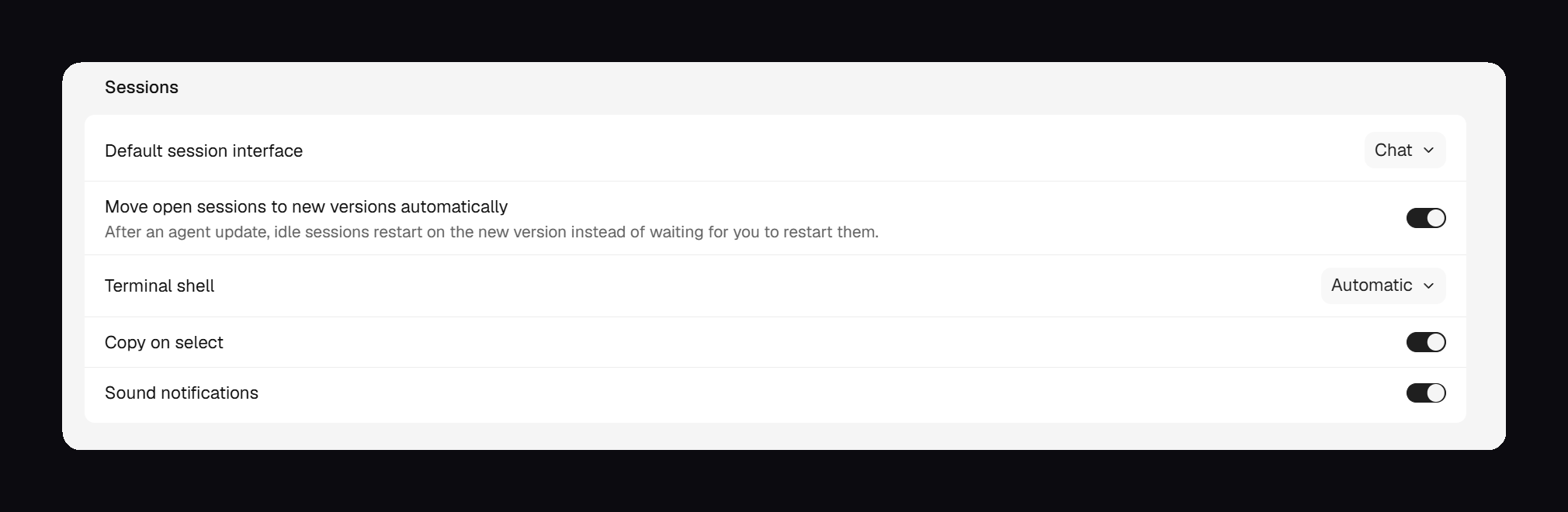
Agents installed with npm, Bun, uv, or pipx are now updated in a copy that AO manages, so your global install is left alone, and old versions are deleted once no session uses them. Some agents, such as Aider and Continue, are never moved automatically. On Windows, AO waits for sessions to go idle, then stops, updates, and resumes them, and you can cancel the wait. Automatic moves are on by default; turn them off with Move open sessions to new versions automatically in Settings › General. Update notices also stay pinned to the right edge of the window.

The Move open sessions to new versions automatically switch in Settings › General, which is on by default.The Move open sessions to new versions automatically switch in Settings › General, which is on by default.

Keep your Mac awake from AO

On macOS, AO can keep your Mac awake on its own, without Connect Mobile. In v0.14.4 this is a single coffee toggle next to Settings in the expanded sidebar, shared with Connect Mobile's Keep awake. Turning it on shows Starting… until your Mac is actually being kept awake. #6838 #6903 #6972

Stay Awake first shipped in v0.14.3 with a Settings › Stay Awake page for timed sessions, automatic rules, lid and display defaults, and an optional automatic Low Power Mode that needed a one-time macOS administrator authorization. v0.14.4 removes that page, along with timed sessions, automatic rules, lid defaults, and the Low Power Mode controls, and the toggle no longer appears in the toolbar or session views. v0.14.4 has no control to revoke the Low Power Mode authorization, so if you granted it in v0.14.3, revoke it in Settings › Stay Awake before updating.

Improvements

Agents and terminal

  • memcode is available as an agent. It runs in Terminal only, without Chat, agent switching, or reviewer support. Install and sign in to memcode first. AO lists its models and supports the Ask, Auto, and Bypass permission modes, but not Accept edits; with a custom memcode endpoint, choose the model in memcode itself. #6515
  • Agents in AO write a short sentence before each command or group of commands, naming the files, branches, or worktrees involved, so Chat no longer shows long runs of commands with no explanation. #6996
  • A failed project Setup script tells you which step failed, its exit code and output, and that the agent didn't start, and points you to Project settings › Scripts. Each Setup step can now run for up to 30 minutes instead of 10. #6976
  • ao:// session links in the terminal open with a plain click, including inside full-screen tools such as Claude Code. #6933

Desktop app

  • Hover Orchestrator.inc in the title bar to see whether you're on stable or a preview build and which version, and the title bar slides smoothly when you toggle the sidebar. #6897
  • On macOS, AO now includes cloudflared, so turning on Connect Mobile no longer stops at Install cloudflared on a Mac without Homebrew. Windows and Linux still install it separately. #7002
  • The top bar's open-workspace menu is one simple list: Finder, terminals, editors, then Copy path. #6977
  • Board cards show two artifact files and expand to show up to ten, with Open in inspector for the rest. #6980

Bug fixes

Chat

  • Stopping a Chat agent now also stops the commands it started, such as dev servers and builds, instead of leaving them running. Idle Codex 0.162 and later terminals can be switched to Chat again. #6822
  • Questions an agent asks and your answers, including anything typed under Other, stay in the chat history, and each new question starts with an empty form. Question cards show the full question above the options instead of a clipped label. #6943 #6936
  • Claude Code chats fill in the plan panel with to-do lists, and Continue picks up a stopped Codex turn that Codex had started on its own to work toward a goal. #6902 #6914

Agents and projects

  • Cline sessions show Input needed only when Cline is really waiting for an approval, and PR cards show a merge right away instead of after a few minutes. #6435 #6932
  • When you stop a Chat agent mid-turn, its board card says Interrupted instead of Awaiting PR until you send another message. Terminal sessions aren't covered yet. #6999
  • Model pickers show your saved model list right away instead of Loading models, and refresh in the background. OpenCode 2 models you switch on in Settings now appear in New Task and Chat for every project, including new ones. #6898 #7001
  • Opening Manage agents while setting up a new project no longer leaves a gray overlay blocking Settings, and your setup progress is kept. #6837

Browser

  • When the daemon refuses the desktop app's browser runtime, the Browser panel explains what happened and how to recover instead of flickering and retrying constantly. Closing a tab that was already closed no longer shows an error. #6565 #6928

Learn more

Everything in this update is in stable v0.14.4, released on October 21. Stay Awake, memcode, the title-bar version, the Browser runtime message, and the Chat fixes for stopped agents and Codex first shipped in v0.14.3. Last week's preview-only items, including the artifact viewer, Continue turn, Chat for GitHub Copilot and Antigravity, and the orchestrator shortcut, are now in stable, starting with v0.14.3.

Artifacts, Chat suggestions, and agent updates in Settings

Find and review what agents produce, pick up conversations faster, keep agent CLIs current from Settings, and move around AO from the keyboard.

Keep the files agents produce in one place, let Chat suggest your next step, update agent CLIs without leaving AO, and get around the app faster.

Find and review everything agents make

A new Artifacts page in the sidebar lists the files agents have produced, grouped by project, with search and a project filter. Create artifact starts a session set up to produce one, and ao spawn --output artifact does the same from the CLI. The page covers sessions on this computer; remote and cloud sessions are not listed. #6567 #6643 #6566

Create an artifact from the Artifacts page, then open what the agent built in the Browser panel.

Sessions with artifacts get an Artifacts tab in the inspector, where you can open the folder in Finder or a terminal, reveal or copy a file, or delete it. Board cards show a session's two newest artifacts, and when the orchestrator mentions a document a session created, you can hover the link to preview it. #6697 #6578 #6547 #6571

When you archive a session that has artifacts, you can also delete its artifact files. The option is unchecked by default. Deleting an artifact, from either place, is permanent, and a restored session starts without those files. #6630

The October 17 preview build opens artifacts in a full viewer. You can edit Markdown in place, select rendered text to send the agent feedback about that passage, and use History to preview or restore earlier versions, including your own saves. Images, rendered SVGs, audio, and video display in Files and Artifacts, with thumbnails in the board-card hover preview. Editing and history work for sessions on this computer only. #6744 #6753 #6583 #6847 #6880 #6840

Pick up a conversation faster

After a reply finishes, Chat can suggest your next message as gray text in the empty composer. Press Tab to insert it as an editable draft, or keep typing to dismiss it. Suggestions never send on their own, and they are generated with the session's model at its lowest reasoning effort, so they use your provider quota. Empty chats also offer a few starter requests. #6575 #6605

Start from a suggested request, then press Tab to use Chat's suggested next message.

In the October 17 preview build, stopping a turn turns the send button into Continue turn, which starts a new turn that picks up the interrupted task. Press Up or Down in the composer to bring back messages you've sent, edit them, and send again. #6328 #6631

Keep agents current from Settings

Settings › Harness gives each agent its own page with Account, Models, and Health tabs. AO tells you when an installed agent CLI has a newer release, and you can update one agent or every eligible agent, log out, and choose which models appear in pickers. Updates never install automatically and are refused while a session of that agent is running. Agents installed through pnpm, Yarn, Volta, asdf, or some vendor installers still need to be updated by hand. Installed agents no longer show a Setup guide button. #5848

Command Code now works in Chat, with in-chat approvals and its own model and effort choices. It needs a Command Code version that includes cmd acp. #6144 #6548

The October 17 preview build adds Chat for GitHub Copilot (Copilot CLI 1.0.93 or later) and Antigravity (1.3.0 or later, using your existing Google sign-in), and both can switch between Terminal and Chat without losing history. Agent updates also fail falsely less often, and a failed update offers Show diagnostics. AO now updates Kimi only when it is installed in its default location; other installs get manual-update guidance. #6662 #6600 #6792 #6816 #6798 #6751

Move around AO faster

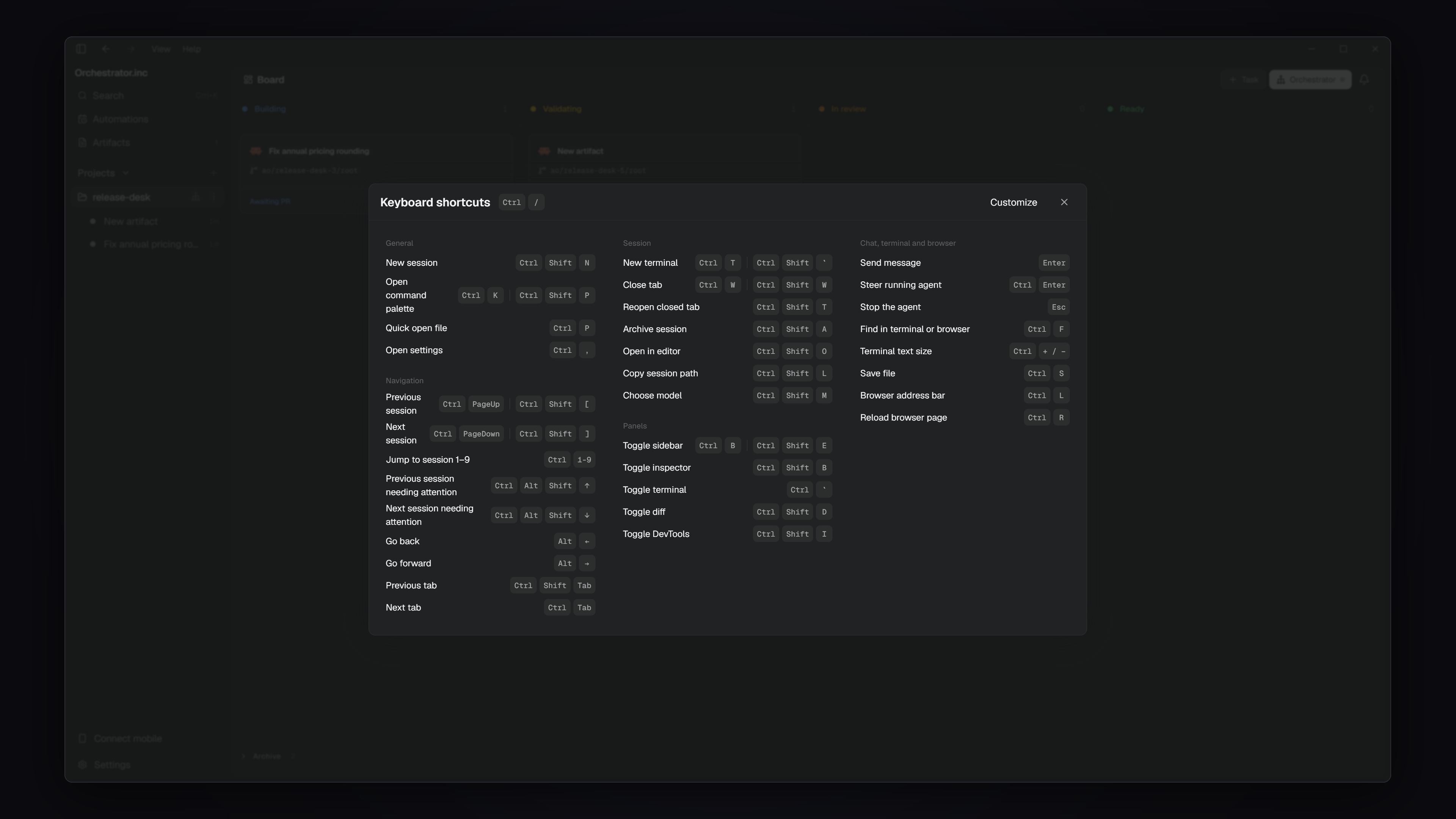
Keyboard shortcuts have been redesigned. Switching sessions follows the sidebar order, tabs, panels, and session actions have new shortcuts, Cmd/Ctrl+/ lists every shortcut, and dialogs, menus, and lists are easier to use from the keyboard. On Windows and Linux, a focused terminal keeps plain Ctrl+T, Ctrl+W, Ctrl+B, Ctrl+K, and Ctrl+/. Use Ctrl+Shift+Backtick for a new terminal, Ctrl+Shift+W to close a tab, Ctrl+Shift+E for the sidebar, Ctrl+Shift+P for the command palette, or Help › Keyboard shortcuts. Custom bindings for removed shortcuts are dropped. #6531

The keyboard shortcuts list, opened with Ctrl+/ on Windows (Cmd+/ on macOS)The keyboard shortcuts list, opened with Ctrl+/ on Windows (Cmd+/ on macOS)

The board appears much sooner when AO launches or reloads, the app uses less memory and CPU while idle, and switching sessions is faster without the layout jumping. The startup screen now shows only the AO icon, and the top bar and session tabs change instantly instead of animating. #6611 #6668 #6724 #6720

In the October 17 preview build, Cmd+Shift+O on macOS or Ctrl+Shift+G on Windows and Linux opens the current project's orchestrator, starting it if needed. #6854

Improvements

Chat

  • Click the title or domain on a link preview card to open the link. Annotation references are easier to scan and remove, though their full-text hover tooltip is gone. #6722 #6708
  • In the preview build, right-click an image to copy or save it, and turn on Wrap content to fit wide HTML pages without horizontal scrolling. #6826 #6881

Files and projects

  • Session cards and the inspector no longer show estimated cost and token counts, which overstated actual spend. There is no replacement view. #6641
  • The Files panel opens files and expands folders faster, and open tabs and folders update as agents write. #6198
  • Folders whose names include symbols, accents, or non-Latin characters can be added as projects. #6570
  • In the preview build, new Git tasks get a short branch and worktree name generated from your prompt, such as ao/vaporwave-site/root. Branches you name yourself are kept. #6811
  • Also in the preview build: the workspace menu copies the path or opens it in Finder, a terminal, or an IDE; code blocks in rendered Markdown have a copy button; multi-repo imports continue past child repositories without a remote; and a long Scratchpad list uses free sidebar space. #6730 #6819 #6624 #6883

Browser

  • Star a profile in Manage Browser Profiles to make it the default for sessions that haven't picked one. #5453
  • When an agent or command opens a page in the session you're viewing, the inspector switches to Browser. Close the last tab with its button or Cmd/Ctrl+W; in the preview build, Browser is then left empty and blank tabs can be closed too. #6679 #6660 #6746
  • Browser data imports no longer present routine skipped items as failures, and the preview build lists Firefox profiles by name with the default preselected. #6646 #6379

Desktop app

  • The app is now called Orchestrator.inc in window titles, the menu bar, the Dock, About, and the Windows installer and shortcuts. The installed app and install folder keep their names. #6647 #6654
  • On macOS, Quit removes AO from the Dock while the tray and AO keep running. Quit AO Completely from the tray still stops everything. #6556
  • Agent logos use official artwork with light and dark versions. #6732 #6595
  • The preview build moves to Electron 44, bringing a current Chromium to the built-in browser. The packaged app no longer accepts ELECTRON_RUN_AS_NODE or --inspect. #6462
  • Settings pages share one layout in the preview build, without the top bar and close button. macOS window transparency is a regular Appearance option there, off by default. #6699 #6815 #6859 #6615 #6729
  • Also in the preview build: Connect Mobile can keep an Apple Silicon MacBook reachable with the lid closed, which also turns on Keep awake and stops at low battery or high temperature; and app updates show download progress. #6589 #6872

Agents and CLI

  • In the preview build, standalone tasks start with the model, mode, and effort shown in New Task, and ao spawn --effort sets reasoning effort for agents that support it. #6033 #5906

Bug fixes

Chat

  • Claude chats no longer stay on Working after background tasks finish or get hibernated while Claude is still working. A turn that hears nothing for 15 minutes now ends with an error. #6270 #6594
  • An orchestrator's Chat shows its real history, and messages sent while it starts are delivered instead of staying Queued. #6562
  • A Chat turn interrupted by an AO restart finishes when AO comes back, for ACP agents such as OpenCode. #6514
  • Links to absolute file paths open the right file or explain that it is outside the session, and numbered lists keep their numbering around code blocks. #6586 #6648
  • In the preview build, scrolling near the end of a chat no longer snaps to the bottom, and failed OpenCode commands show their exit code. #6781 #6413

Agents and terminal

  • Rewinding a Codex chat works again with Codex 0.162 and later, and mouse-wheel scrolling works in Codex's Terminal UI. #6591 #6367
  • Sessions stuck after a failed interface or agent switch recover and can be archived again. A session whose start failed must now be retried before switching interfaces. #6743
  • Projects whose ID contains a dot start Terminal UI sessions normally, and Command Cues use the project's shell startup settings. #6569 #6351
  • Installing Cursor no longer fails verification on a slow first launch, Kimchi login opens its sign-in picker, and AO stops Linux preview servers correctly after the clock jumps. #6289 #6489 #6728
  • In the preview build, Kiro shows Input needed only for real approvals, DeepSeek Harness agents receive their role instructions and start long tasks on Windows, and a headless claude -p run no longer takes over a Claude session. #6601 #6845 #6539

Browser and files

  • The inspector's Files filter no longer crowds the file tab. #6656
  • In the preview build, pages and sign-in popups that close themselves no longer break the Browser panel, popup sign-ins such as Google can finish, pages like Linear respond to clicks again, dialogs stay above the page, and the address bar stays centered. #6620 #6791 #6766 #6814 #6835
  • Also in the preview build, artifacts no longer fail to load when another app uses the same port or when file names contain special characters. #6780

Learn more

Changes not marked as preview are in stable v0.14.2. Preview items require the October 17 preview build. Last week's preview-only color themes, file-tree update, and tunnel-only pairing fix are now in stable, starting with v0.14.0.

Pages in Chat, file feedback, and project scripts

See interactive results in your conversation, discuss code without copying it, and prepare each workspace with saved commands.

Keep charts and diagrams inside Chat, send file feedback together, and give new workspaces the setup they need before an agent starts.

See interactive results inside Chat

Agents can show a chart, table, diagram, or self-contained HTML page directly in a local Chat conversation. Expand it for a closer look, view its source, download it, or keep it as a session artifact. Pages follow your light or dark theme and run in an isolated frame. Remote-host chats do not display inline pages. #6327

An agent charts real project data in Chat; expand the page or view its source.

Select text in an earlier message and choose Add to chat to refer to that passage in your next question. Excerpt references let you jump back to the highlighted source instead of searching through the conversation. #6395

Discuss and edit files without leaving AO

Highlight lines in a file or diff and choose Ask in chat, or press Cmd/Ctrl+L, to add the selected code to your question. For change requests, keep comments open across several lines and files, then send them individually or together as one message. #6277 #6389

Ask about highlighted code, then send comments on several files as one message.

Markdown files have a source editor with controls for headings, lists, emphasis, quotes, and links. Undo, unsaved-change tracking, and read-only restrictions still apply. #6308

Set up each workspace with saved commands

Project Settings has a Scripts page for local projects, with ordered Setup and Cleanup commands. Setup runs before the agent starts in a new workspace. Cleanup runs before a managed Git worktree is permanently removed—not on app quit or ordinary agent exit. If cleanup fails, AO keeps the workspace and lets you retry. #6092

Cues remain reusable actions you run yourself. Their Run on worktree creation option has been removed; move automatic initialization commands to Setup scripts instead. #6243

The Environment page lets you save project variables or paste several .env lines for review. New agents, terminals, command Cues, reviews, and setup commands receive those values. Values are masked in the editor; project configuration is not a secret vault. #6091

Give settings room to breathe

Settings opens as a page inside the app, with sections in the sidebar and a Back action. Your previous page stays mounted underneath, preserving its scroll position and running terminals. #6439

The October 11 preview build adds 20 color themes, each with light and dark palettes. Hover or use the arrow keys to preview a theme across the app; select it to keep it, or dismiss the menu to return to your saved choice. #6532

Improvements

Chat and tasks

  • New Chat tasks show the actual startup steps—fetching, preparing the worktree, running setup, and starting the agent—rather than one undifferentiated spinner. #6322
  • Choose a project or Scratchpad from the New Task dialog without losing the task draft. #6079
  • Image attachments open full size. When you paste an image into a message that already contains text, its inline reference appears at the caret; image-only drafts avoid duplicate previews. #6307 #6381
  • Replies stream more smoothly, and Chat follows new output until you scroll away. Longer conversations and sidebar transitions do less rendering work. #6396 #6304 #6129 #6315 #6316

Reviews and workspace

  • The Summary tab shows the current branch, uncommitted files, and commits waiting to be pushed, with actions to commit, push, and create a PR. #6323
  • Workers can request AO's native PR review. Enable Workers request AO review in Project Settings to have them request a pass when their PR is ready and after fixes; it is off by default. Reviewers do not approve or merge on your behalf. #6262
  • Command Code, Codewhale, and OpenHands CLI join the Terminal UI agent choices. These additions do not include Chat support. #5959 #5856 #5847
  • Claude's model picker groups the newest models by family, folds older versions under Other models, and remembers the last-used model for new tasks. #6344

Browser and desktop

  • Find text in the Browser panel with Cmd/Ctrl+F, see match counts, and move between results. #6233
  • Browser downloads wait for your permission in the Downloads list before writing a file. #6388
  • A configured browser profile is used by default, and profile switches recover more reliably while pages load. #6345
  • On macOS, closing or ordinarily quitting the desktop window keeps AO and enabled mobile access running. Use Quit AO Completely from the tray to stop everything. The app also uses SF Pro and SF Mono on macOS. #6472 #6448

Bug fixes

Chat and sessions

  • Sending a message clears the input while delivery is pending, so you can write the next one. Delivery retries retain the original message and attachments without replacing the new draft. Queue flashes, repeated send animations, and scroll jumps are reduced. #6418 #6405
  • Existing chats stay readable while a stopped agent resumes. Claude chats reconnect to surviving hosts after restart, and fresh sessions no longer adopt an unrelated transcript when a session ID is reused. #6342 #6350 #6471
  • Switching between Chat and Terminal shows the destination promptly while the handoff finishes. Switching an idle Terminal to Chat no longer gets blocked by an unsent terminal draft; that draft is discarded during the switch. #6486 #6366
  • Sessions stay Working while background subagents are still running, instead of briefly appearing idle. #6201

Reviews, files, and agents

  • Stopping a Chat review keeps its conversation connected. Archiving a reviewer keeps its tab closed across refresh and restart without deleting its history. #6291
  • Reviewer drafts and model settings stay separate from the worker's, and opening a PR card no longer crashes when mergeability details are missing. #6118 #6287
  • Same-repository PRs are discovered after a GitHub repository rename or transfer. Release-note links work with both the old and current repository addresses. #6319 #6275
  • Images open directly in the file viewer and Changes panel without waiting for syntax highlighting. #6310
  • Devin and MiMo model discovery is repaired, and Claude family aliases accept the reasoning levels shown in the picker. #6295 #6437 #6375

Automations, browser, and terminal

  • Changing only an automation's timezone preserves its local start time and interval anchor. The CLI lists every automation page instead of stopping at the first. #6346 #6349
  • Reattaching to a long-running terminal restores the terminal modes needed for scrolling and input. Switching among many terminals no longer leaves older panes stuck on the slower renderer. #5445 #6465
  • Browser commands wait briefly for the app connection to recover and report clearer failures. Screenshots handle hidden browser views more reliably. #5484 #5552
  • The October 11 preview build keeps the open file selected when you expand a folder, centers the inspector search fields, and shows a pairing QR when the desktop has a ready HTTPS tunnel but no LAN address. #6530 #6506

Learn more

Most changes above are included in v0.13.7. The 20-theme catalog, updated file tree, and tunnel-only pairing fix require the October 11 preview build.

Reusable Cues, file search, and faster terminals

Save repeatable tasks, choose from more agents, and spend less time waiting for files and terminal output.

Save repeatable work as Cues, find files from the command palette, and spend less time waiting for reviews and terminal output.

Save repeatable work as Cues #5391

Save an instruction or shell command once in Project Settings, then run it from a session or orchestrator toolbar. Agent Cues send the instruction to the selected agent; Command Cues open a fresh terminal and run the saved command without interrupting the agent. Cues are available for local projects.

Save reusable instructions as project Cues.

More choices for your agents

OpenCode 2 is available for Terminal UI, Chat, and reviews, alongside existing OpenCode 1 sessions. DeepSeek Harness adds Chat with model and reasoning controls. Gemini CLI and MiMo Code join the Terminal UI options; fx support is experimental and Terminal UI only. #6043 #6014 #5502 #5893 #5436

Find and review files with less waiting

Search workspace files from the command palette and open a result directly in Files. From a project page, choose the session or worktree to search first. The file viewer loads changes in batches instead of blocking on a full scan, and returning to a file keeps its preview mode and scroll position. #6193 #6145 #5997 #6130

Find a workspace file and open it directly from search.

Faster terminal output and startup

Large bursts of terminal output reach the screen faster, and a new shell shows its first prompt without waiting behind a history-replay cover. New terminals start at their tab's actual size, while rapid open-and-close actions no longer leave duplicate or reappearing tabs. #6232 #6203 #6213 #6196

Improvements

Tasks and navigation

  • Automations use a compact list with All, Enabled, and Paused filters, clearer schedules, and expandable run history. #6116
  • Session links in Chat and the terminal open the linked session inside AO. #4606
  • Opening a session leaves the inspector closed until needed. Long project lists show six agents with a Show more control. #6046
  • The command palette has a Go to home action, and Home keeps standalone tasks available even when Cloud is enabled. #6176

Models and reviews

  • Model pickers show the agent's configured default when it can be identified, including readable Claude alias names. #6063 #5961
  • Model search supports typing, Backspace, and keyboard selection more consistently; task controls leave more room for agent, model, and effort labels. #6208 #6206 #6106
  • Worker-reported PR and merge-request links appear in the inspector, including links to other repositories. Reference-only cards are distinguished from PRs AO actively tracks. #6019
  • The session inspector distinguishes unresolved comments from a formal Changes requested review, and keeps comment feedback visible while an agent works. #6015

Files and browser

  • The Files panel has a direct Workspace button, and filters and file actions fit better in a narrow inspector. #6081
  • Large PRs load a bounded commit list; opening a specific PR commit reads that commit directly. #5988
  • Browser profiles have named actions for renaming, clearing data, and deletion, and download progress is visible again. #5924
  • Browser actions can wait for a page change and distinguish a dispatched click from a confirmed result, without repeating the action when confirmation is missing. #4783

Bug fixes

Chat and sessions

  • Startup no longer waits through avoidable requirement-check retries; hovering or focusing a local Chat session starts loading its conversation before you open it. #5994 #5980
  • Switching chats restores the destination inspector layout immediately. Sign-in warnings clear after the active conversation successfully recovers, and clicking back into Chat preserves the draft's caret position. #6183 #6186 #6229
  • A stopped session no longer stays active just because its worktree could not be removed. Files are preserved for later cleanup. #5645
  • Archived standalone agents have a dedicated Scratchpad list and restore to the correct session. #5979
  • Review-only tasks no longer receive instructions to claim ownership of the PR being reviewed. #5992
  • Automatic issue intake is off by default to prevent unbounded worker spawning; its settings are hidden unless the daemon explicitly enables it. #6008 #6059

Browser and pairing

  • Browser imports preserve host-only login cookies, and importing from Chrome no longer probes protected Safari data. Website Copy link actions work in the active page, and profile-switch failures are shown instead of silently falling back. #5955 #6075
  • Annotation outlines stay attached to the selected element while scrolling. Sent annotations appear in Chat, including while queued, and count as user activity. #5960 #6117 #5982
  • Connect Mobile shows the local pairing QR as soon as it is ready, then refreshes it when remote access becomes available. Settings text stays sharp and nested menus and confirmations remain usable. #5981 #6002 #6016
  • Browser commands stop with a target-mismatch error if a popup leaves the selected tab unconfirmed, rather than acting on another tab. #4821

Terminal and layout

  • Switching an empty Codex terminal back to Chat no longer mistakes placeholder text for an unsent draft. Claude window-title text is no longer mistaken for a draft either. #6041 #5322
  • Terminal redraws remain visible during panel resizing, keyboard focus returns after switching terminal tabs, and shell terminals no longer inherit Cursor-specific color handling. #6168 #6167 #6139
  • The inspector grows back after a narrow-window tab switch, and macOS titlebar controls stay aligned through zoom and sidebar transitions. #6161 #6192

Files and updates

  • Files review defaults to combined workspace changes again, and Markdown heading links are no longer clipped. #5854 #5968
  • Downloaded updates retain their release notes across app restarts. The restart dialog gives notes room to grow while keeping its buttons visible. #5966 #5976

Learn more

This update covers v0.13.3 and the October 4 preview build. File search and other improvements added after v0.13.3 require the preview build; check the linked release notes for availability.

Earlier updates

AO Mobile v2.0.0, scheduled automations, and visible context limits

AO Mobile v2.0.0 is out now, alongside recurring agent tasks, clearer context limits, and smarter browser work.

Standalone sessions, faster startup, and clearer project setup

Start focused agent sessions without a repository, open browser tools only when you need them, and get into projects faster.

Durable chat, fast large diffs, and smoother project imports

Chat survives daemon restarts, large files stay responsive, and creating or importing a repository gets you to the board sooner.

Account switching, browser profiles, and permission defaults

Agent accounts can be switched centrally, browser profiles persist, and project permissions can be remembered.

Cost estimates, editable chat, and full workspace files

AO added estimated usage cost, editable Claude conversations, and a full workspace file browser beside changed files.

Git URL onboarding, richer reviews, and more chat providers

Projects can start from a Git URL, review feedback appears inline, and more agent providers work through structured chat.

GitLab support, better mobile chat, and automatic reviews

AO added GitLab repositories, improved the phone chat experience, and made pull-request reviews easier to start and control.

Eight languages, pinned sessions, and safer recovery

The desktop app gained eight languages, important sessions can stay pinned, and recovery failures no longer clear the board.

Usage visibility, dedicated docs, and faster startup

Session cards began showing token usage, documentation moved into a focused site, and startup gained a clear loading state.

Mobile alerts, standalone terminals, and a more capable browser

Push notifications can reach your phone, shell terminals work independently of agent sessions, and browser and file workflows are easier to use.

Faster session creation, native file drops, and update controls

New sessions became easier to launch while terminals gained native file drops and updates became visible from the sidebar.

Connect Mobile, in-app browser feedback, and agent switching

The phone app can connect securely on a local network, browser previews accept visual feedback, and a session can change agents without losing its worktree.

Safer agent selection, GitHub issue intake, and multi-PR reviews

AO can verify agent availability, pull work from GitHub issues, and show review state across more than one pull request.

Desktop auto-updates and a clearer settings foundation

The desktop app gained signed, channel-aware updates and the first version of global update settings.

AO's month-long architecture rewrite

A historical note on the Go daemon and Electron desktop foundation built during AO's June rewrite.

Cleaner pull-request data and more reliable enrichment

Duplicate pull-request associations are removed before they reach session views and enrichment.

A maintenance week focused on release readiness

No separate customer-facing feature was announced this week.

Windows folder selection beyond the home directory

Windows users can select project folders outside their home directory.

More reliable notifications and Grok support

Notifications gained stronger delivery and setup tools, Grok joined the agent catalog, and activity became visible across the CLI and app.

Weekly updates, clearer navigation, and better CI recovery

The release flow became predictable, navigation was polished, and agents received more useful CI failure context.

Native Windows support and programmable pipelines

AO became a first-class Windows application and added staged, parallel agent pipelines from the CLI.

Kimi Code support and a durable activity timeline

Kimi Code joined AO while session and system activity gained a durable event history.

Task-based session names and automatic cleanup after merge

Sessions became easier to identify and completed pull-request work could close itself without cluttering the active view.

A faster terminal workspace and safer updates

Terminal navigation became more immediate, AO gained install-aware updates, and macOS could stay awake while work was running.

Cursor support, prompt-driven sessions, and a lighter dashboard

Cursor joined the agent catalog, sessions could start from a prompt alone, and the dashboard shipped far less JavaScript.

One dashboard for every project

A unified multi-project dashboard, isolated orchestrators, and live browser titles made larger AO setups easier to manage.

OpenClaw and Discord notifications, themes, and faster PR data

New integrations and themes landed while pull-request data and command response times became faster and more reliable.

One-command setup with less configuration

AO can now initialize a project, find an available port, and start with fewer manual setup steps.

Project dashboards, workflow automation, and health checks

Project-scoped navigation arrived alongside automated task lifecycle controls and practical maintenance tools.

Mobile monitoring, OpenCode lifecycle, and PR claiming

AO added a mobile session view, deeper OpenCode lifecycle support, and ownership for pull-request work.

Stronger Codex sessions and a live dashboard

Codex reached fuller feature parity, the dashboard began updating live, and large session lists loaded much faster.

Faster setup, clearer sessions, and crash recovery

Setup became simpler while sessions gained clearer names, live activity, and recovery after an agent exits.

The first AO dashboard, CLI, and agent runtime

AO's first week established the dashboard, command-line workflow, agent integrations, and managed session foundation.