
Artifacts, Chat suggestions, and agent updates in Settings
Find and review what agents produce, pick up conversations faster, keep agent CLIs current from Settings, and move around AO from the keyboard.
Keep the files agents produce in one place, let Chat suggest your next step, update agent CLIs without leaving AO, and get around the app faster.
Find and review everything agents make
A new Artifacts page in the sidebar lists the files agents have produced, grouped by project, with search and a project filter. Create artifact starts a session set up to produce one, and ao spawn --output artifact does the same from the CLI. The page covers sessions on this computer; remote and cloud sessions are not listed. #6567 #6643 #6566
Sessions with artifacts get an Artifacts tab in the inspector, where you can open the folder in Finder or a terminal, reveal or copy a file, or delete it. Board cards show a session's two newest artifacts, and when the orchestrator mentions a document a session created, you can hover the link to preview it. #6697 #6578 #6547 #6571
When you archive a session that has artifacts, you can also delete its artifact files. The option is unchecked by default. Deleting an artifact, from either place, is permanent, and a restored session starts without those files. #6630
The October 17 preview build opens artifacts in a full viewer. You can edit Markdown in place, select rendered text to send the agent feedback about that passage, and use History to preview or restore earlier versions, including your own saves. Images, rendered SVGs, audio, and video display in Files and Artifacts, with thumbnails in the board-card hover preview. Editing and history work for sessions on this computer only. #6744 #6753 #6583 #6847 #6880 #6840
Pick up a conversation faster
After a reply finishes, Chat can suggest your next message as gray text in the empty composer. Press Tab to insert it as an editable draft, or keep typing to dismiss it. Suggestions never send on their own, and they are generated with the session's model at its lowest reasoning effort, so they use your provider quota. Empty chats also offer a few starter requests. #6575 #6605
Start from a suggested request, then press Tab to use Chat's suggested next message.In the October 17 preview build, stopping a turn turns the send button into Continue turn, which starts a new turn that picks up the interrupted task. Press Up or Down in the composer to bring back messages you've sent, edit them, and send again. #6328 #6631
Keep agents current from Settings
Settings › Harness gives each agent its own page with Account, Models, and Health tabs. AO tells you when an installed agent CLI has a newer release, and you can update one agent or every eligible agent, log out, and choose which models appear in pickers. Updates never install automatically and are refused while a session of that agent is running. Agents installed through pnpm, Yarn, Volta, asdf, or some vendor installers still need to be updated by hand. Installed agents no longer show a Setup guide button. #5848
Command Code now works in Chat, with in-chat approvals and its own model and effort choices. It needs a Command Code version that includes cmd acp. #6144 #6548
The October 17 preview build adds Chat for GitHub Copilot (Copilot CLI 1.0.93 or later) and Antigravity (1.3.0 or later, using your existing Google sign-in), and both can switch between Terminal and Chat without losing history. Agent updates also fail falsely less often, and a failed update offers Show diagnostics. AO now updates Kimi only when it is installed in its default location; other installs get manual-update guidance. #6662 #6600 #6792 #6816 #6798 #6751
Move around AO faster
Keyboard shortcuts have been redesigned. Switching sessions follows the sidebar order, tabs, panels, and session actions have new shortcuts, Cmd/Ctrl+/ lists every shortcut, and dialogs, menus, and lists are easier to use from the keyboard. On Windows and Linux, a focused terminal keeps plain Ctrl+T, Ctrl+W, Ctrl+B, Ctrl+K, and Ctrl+/. Use Ctrl+Shift+Backtick for a new terminal, Ctrl+Shift+W to close a tab, Ctrl+Shift+E for the sidebar, Ctrl+Shift+P for the command palette, or Help › Keyboard shortcuts. Custom bindings for removed shortcuts are dropped. #6531
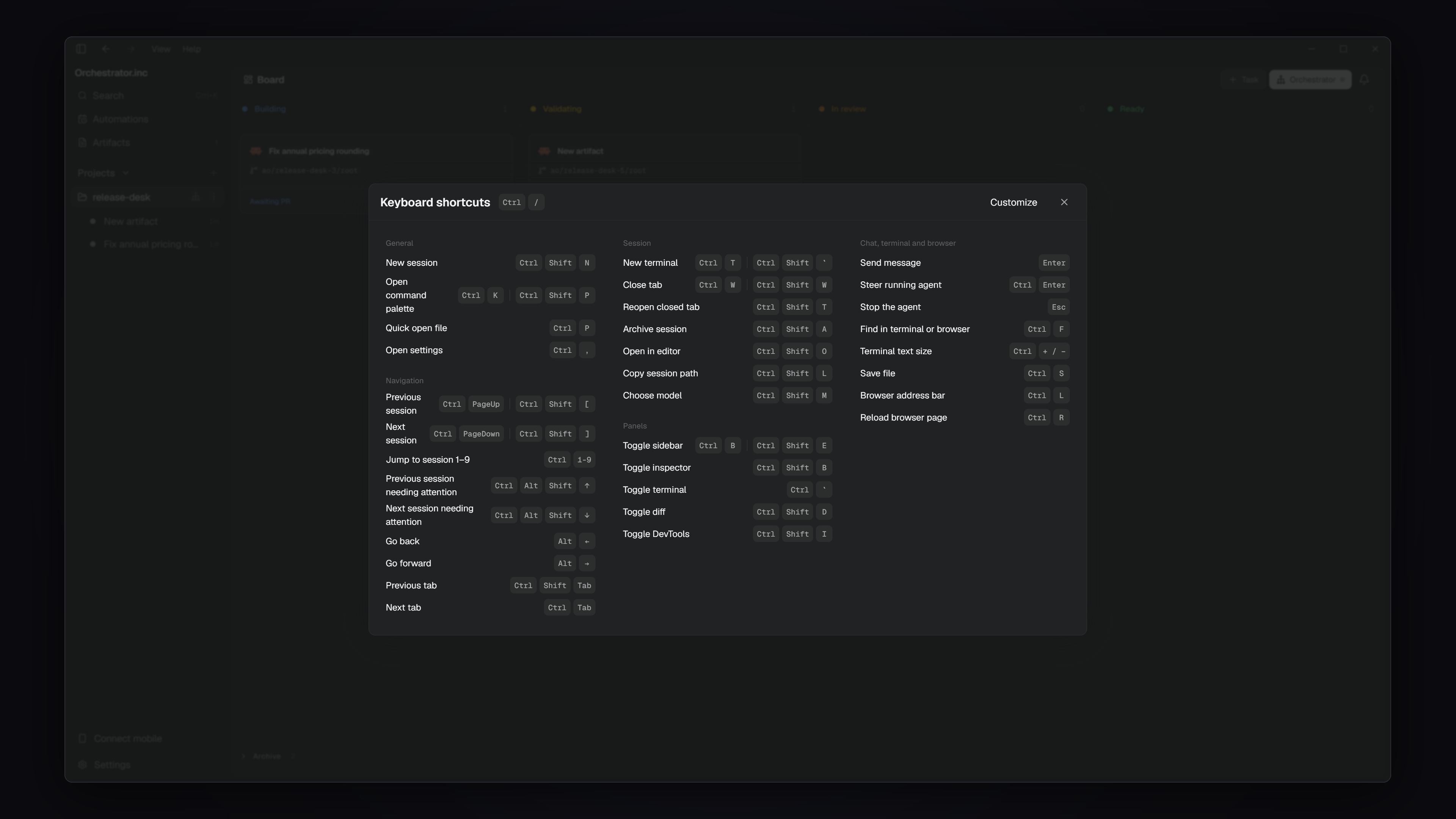 The keyboard shortcuts list, opened with Ctrl+/ on Windows (Cmd+/ on macOS)
The board appears much sooner when AO launches or reloads, the app uses less memory and CPU while idle, and switching sessions is faster without the layout jumping. The startup screen now shows only the AO icon, and the top bar and session tabs change instantly instead of animating. #6611 #6668 #6724 #6720
In the October 17 preview build, Cmd+Shift+O on macOS or Ctrl+Shift+G on Windows and Linux opens the current project's orchestrator, starting it if needed. #6854
Improvements
Chat
- Click the title or domain on a link preview card to open the link. Annotation references are easier to scan and remove, though their full-text hover tooltip is gone. #6722 #6708
- In the preview build, right-click an image to copy or save it, and turn on Wrap content to fit wide HTML pages without horizontal scrolling. #6826 #6881
Files and projects
- Session cards and the inspector no longer show estimated cost and token counts, which overstated actual spend. There is no replacement view. #6641
- The Files panel opens files and expands folders faster, and open tabs and folders update as agents write. #6198
- Folders whose names include symbols, accents, or non-Latin characters can be added as projects. #6570
- In the preview build, new Git tasks get a short branch and worktree name generated from your prompt, such as
ao/vaporwave-site/root. Branches you name yourself are kept. #6811 - Also in the preview build: the workspace menu copies the path or opens it in Finder, a terminal, or an IDE; code blocks in rendered Markdown have a copy button; multi-repo imports continue past child repositories without a remote; and a long Scratchpad list uses free sidebar space. #6730 #6819 #6624 #6883
Browser
- Star a profile in Manage Browser Profiles to make it the default for sessions that haven't picked one. #5453
- When an agent or command opens a page in the session you're viewing, the inspector switches to Browser. Close the last tab with its button or Cmd/Ctrl+W; in the preview build, Browser is then left empty and blank tabs can be closed too. #6679 #6660 #6746
- Browser data imports no longer present routine skipped items as failures, and the preview build lists Firefox profiles by name with the default preselected. #6646 #6379
Desktop app
- The app is now called Orchestrator.inc in window titles, the menu bar, the Dock, About, and the Windows installer and shortcuts. The installed app and install folder keep their names. #6647 #6654
- On macOS, Quit removes AO from the Dock while the tray and AO keep running. Quit AO Completely from the tray still stops everything. #6556
- Agent logos use official artwork with light and dark versions. #6732 #6595
- The preview build moves to Electron 44, bringing a current Chromium to the built-in browser. The packaged app no longer accepts
ELECTRON_RUN_AS_NODEor--inspect. #6462 - Settings pages share one layout in the preview build, without the top bar and close button. macOS window transparency is a regular Appearance option there, off by default. #6699 #6815 #6859 #6615 #6729
- Also in the preview build: Connect Mobile can keep an Apple Silicon MacBook reachable with the lid closed, which also turns on Keep awake and stops at low battery or high temperature; and app updates show download progress. #6589 #6872
Agents and CLI
- In the preview build, standalone tasks start with the model, mode, and effort shown in New Task, and
ao spawn --effortsets reasoning effort for agents that support it. #6033 #5906
Bug fixes
Chat
- Claude chats no longer stay on Working after background tasks finish or get hibernated while Claude is still working. A turn that hears nothing for 15 minutes now ends with an error. #6270 #6594
- An orchestrator's Chat shows its real history, and messages sent while it starts are delivered instead of staying Queued. #6562
- A Chat turn interrupted by an AO restart finishes when AO comes back, for ACP agents such as OpenCode. #6514
- Links to absolute file paths open the right file or explain that it is outside the session, and numbered lists keep their numbering around code blocks. #6586 #6648
- In the preview build, scrolling near the end of a chat no longer snaps to the bottom, and failed OpenCode commands show their exit code. #6781 #6413
Agents and terminal
- Rewinding a Codex chat works again with Codex 0.162 and later, and mouse-wheel scrolling works in Codex's Terminal UI. #6591 #6367
- Sessions stuck after a failed interface or agent switch recover and can be archived again. A session whose start failed must now be retried before switching interfaces. #6743
- Projects whose ID contains a dot start Terminal UI sessions normally, and Command Cues use the project's shell startup settings. #6569 #6351
- Installing Cursor no longer fails verification on a slow first launch, Kimchi login opens its sign-in picker, and AO stops Linux preview servers correctly after the clock jumps. #6289 #6489 #6728
- In the preview build, Kiro shows Input needed only for real approvals, DeepSeek Harness agents receive their role instructions and start long tasks on Windows, and a headless
claude -prun no longer takes over a Claude session. #6601 #6845 #6539
Browser and files
- The inspector's Files filter no longer crowds the file tab. #6656
- In the preview build, pages and sign-in popups that close themselves no longer break the Browser panel, popup sign-ins such as Google can finish, pages like Linear respond to clicks again, dialogs stay above the page, and the address bar stays centered. #6620 #6791 #6766 #6814 #6835
- Also in the preview build, artifacts no longer fail to load when another app uses the same port or when file names contain special characters. #6780
Learn more
Changes not marked as preview are in stable v0.14.2. Preview items require the October 17 preview build. Last week's preview-only color themes, file-tree update, and tunnel-only pairing fix are now in stable, starting with v0.14.0.