
Usage-limit recovery, branch reviews in Files, and agent updates that don't interrupt
Pick up after a usage limit resets, review branches and picked commits without checking them out, update agent CLIs while sessions keep working, and keep your Mac awake from AO.
Get back to work when a usage limit resets, review any branch or set of commits from the Files panel, update agents without stopping what they're doing, and keep your Mac awake while agents run.
Pick up where a usage limit stopped you
When Claude Code or Codex hits a usage limit in Chat, you now see a Usage limit reached notice with the local reset time and a countdown instead of a generic failure. Click Auto-resume at reset and AO sends your prompt again once the limit resets, even if you closed the chat or restarted AO in the meantime. Auto-resume is off until you choose it for that prompt, and you can cancel it any time before the reset. When the provider doesn't report a reset time, use Resume to retry yourself. This covers Claude Code and Codex Chat sessions. #6717
Review branches and picked commits in Files
The Files panel now reviews more than your uncommitted work. Under Changes, choose Uncommitted, Staged, or Unstaged, or tick several commits to review them together. Under Branch, pick a local or remote branch, or a PR whose branch isn't on your machine. AO reads it without checking it out, so your worktree and staged changes stay as they are. #6793
Pick a remote branch in Files, browse all of its files, and open its version of a file as a read-only tab.All files lists the whole repository at that point, including unchanged files, with a path filter. Older versions open read-only in their own tabs next to your editable copy, and a deleted file shows what it used to contain. Unified or split view and collapse or expand all are in the toolbar. If the commits you tick have gaps between them and don't combine cleanly, AO offers to include the commits in between or show all commits.
Update agents while sessions keep working
Updating an agent CLI no longer means stopping your sessions. Running sessions stay on their current version, and AO moves each one to the new version after it has been idle for about 10 minutes. It never switches a session mid-turn, while messages or approvals are waiting, while its terminal is on screen with typed input, or while a command is running. Chat sessions show when they are switching versions. #6745 #6954
Agents installed with npm, Bun, uv, or pipx are now updated in a copy that AO manages, so your global install is left alone, and old versions are deleted once no session uses them. Some agents, such as Aider and Continue, are never moved automatically. On Windows, AO waits for sessions to go idle, then stops, updates, and resumes them, and you can cancel the wait. Automatic moves are on by default; turn them off with Move open sessions to new versions automatically in Settings › General. Update notices also stay pinned to the right edge of the window.
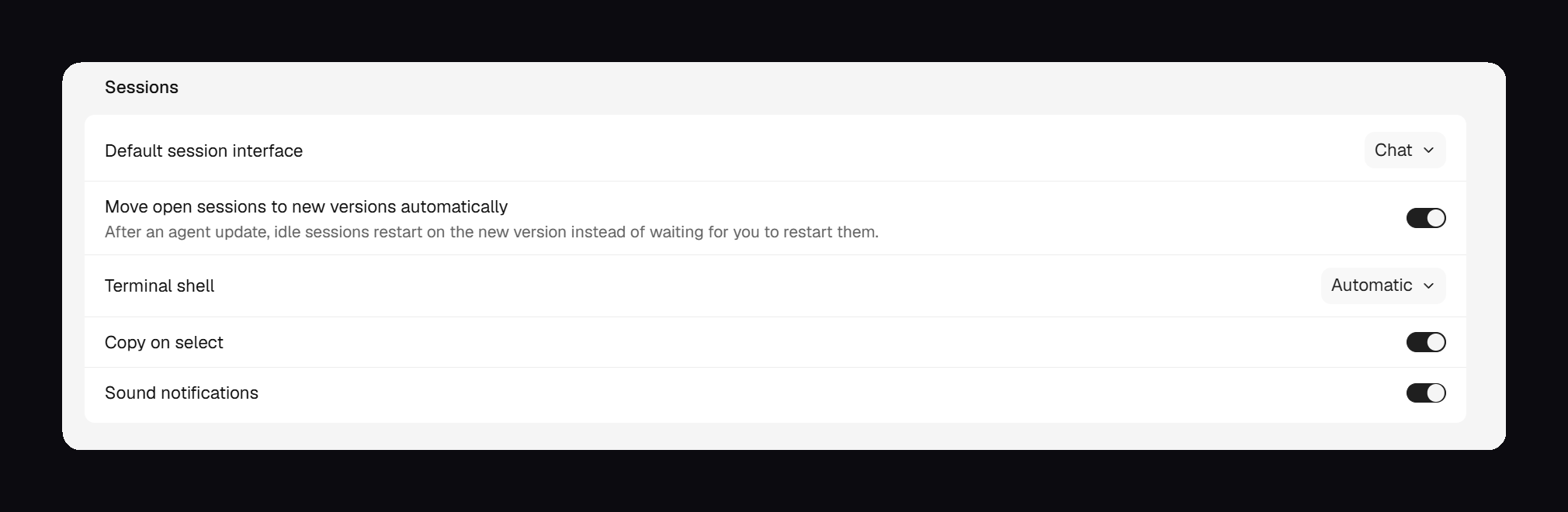 The Move open sessions to new versions automatically switch in Settings › General, which is on by default.
Keep your Mac awake from AO
On macOS, AO can keep your Mac awake on its own, without Connect Mobile. In v0.14.4 this is a single coffee toggle next to Settings in the expanded sidebar, shared with Connect Mobile's Keep awake. Turning it on shows Starting… until your Mac is actually being kept awake. #6838 #6903 #6972
Stay Awake first shipped in v0.14.3 with a Settings › Stay Awake page for timed sessions, automatic rules, lid and display defaults, and an optional automatic Low Power Mode that needed a one-time macOS administrator authorization. v0.14.4 removes that page, along with timed sessions, automatic rules, lid defaults, and the Low Power Mode controls, and the toggle no longer appears in the toolbar or session views. v0.14.4 has no control to revoke the Low Power Mode authorization, so if you granted it in v0.14.3, revoke it in Settings › Stay Awake before updating.
Improvements
Agents and terminal
- memcode is available as an agent. It runs in Terminal only, without Chat, agent switching, or reviewer support. Install and sign in to memcode first. AO lists its models and supports the Ask, Auto, and Bypass permission modes, but not Accept edits; with a custom memcode endpoint, choose the model in memcode itself. #6515
- Agents in AO write a short sentence before each command or group of commands, naming the files, branches, or worktrees involved, so Chat no longer shows long runs of commands with no explanation. #6996
- A failed project Setup script tells you which step failed, its exit code and output, and that the agent didn't start, and points you to Project settings › Scripts. Each Setup step can now run for up to 30 minutes instead of 10. #6976
ao://session links in the terminal open with a plain click, including inside full-screen tools such as Claude Code. #6933
Desktop app
- Hover Orchestrator.inc in the title bar to see whether you're on stable or a preview build and which version, and the title bar slides smoothly when you toggle the sidebar. #6897
- On macOS, AO now includes cloudflared, so turning on Connect Mobile no longer stops at Install cloudflared on a Mac without Homebrew. Windows and Linux still install it separately. #7002
- The top bar's open-workspace menu is one simple list: Finder, terminals, editors, then Copy path. #6977
- Board cards show two artifact files and expand to show up to ten, with Open in inspector for the rest. #6980
Bug fixes
Chat
- Stopping a Chat agent now also stops the commands it started, such as dev servers and builds, instead of leaving them running. Idle Codex 0.162 and later terminals can be switched to Chat again. #6822
- Questions an agent asks and your answers, including anything typed under Other, stay in the chat history, and each new question starts with an empty form. Question cards show the full question above the options instead of a clipped label. #6943 #6936
- Claude Code chats fill in the plan panel with to-do lists, and Continue picks up a stopped Codex turn that Codex had started on its own to work toward a goal. #6902 #6914
Agents and projects
- Cline sessions show Input needed only when Cline is really waiting for an approval, and PR cards show a merge right away instead of after a few minutes. #6435 #6932
- When you stop a Chat agent mid-turn, its board card says Interrupted instead of Awaiting PR until you send another message. Terminal sessions aren't covered yet. #6999
- Model pickers show your saved model list right away instead of Loading models, and refresh in the background. OpenCode 2 models you switch on in Settings now appear in New Task and Chat for every project, including new ones. #6898 #7001
- Opening Manage agents while setting up a new project no longer leaves a gray overlay blocking Settings, and your setup progress is kept. #6837
Browser
- When the daemon refuses the desktop app's browser runtime, the Browser panel explains what happened and how to recover instead of flickering and retrying constantly. Closing a tab that was already closed no longer shows an error. #6565 #6928
Learn more
Everything in this update is in stable v0.14.4, released on October 21. Stay Awake, memcode, the title-bar version, the Browser runtime message, and the Chat fixes for stopped agents and Codex first shipped in v0.14.3. Last week's preview-only items, including the artifact viewer, Continue turn, Chat for GitHub Copilot and Antigravity, and the orchestrator shortcut, are now in stable, starting with v0.14.3.