
Agent switching for everyone, worker updates in the orchestrator chat, and chats that reconnect on their own
Hand a session to another agent without Developer mode, follow workers from the orchestrator chat, get back to work sooner after a restart, and start tasks without waiting for a name.
Hand a session to a different agent halfway through, see what your workers are doing without leaving the orchestrator chat, pick up chats right after AO restarts, and start new tasks sooner.
Switch agents in the middle of a session
You can now hand a local session to a different coding agent without turning on Developer mode. In Chat, choose another agent from the model picker; it takes over on your next message with a handoff note summarizing the session so far. In a Terminal UI session, open the session tab's ⋯ menu, choose Agent, then Switch. Only agents that are installed and ready on your computer are offered, Chat lists only agents that support Chat, and you can switch only while the agent is idle, not mid-turn or while it waits for an approval or answer. Cloud sessions can't switch agents. #7126
Switch a chat from Codex to Claude Code in the model picker, and Claude Code picks up the conversation on your next message.The redesigned model picker groups models by maker and adds an effort slider, fast and thinking toggles, and plan and fast mode for Codex and Claude Code. When you pick another agent, it shows the model and effort that agent will start with. Fast and plan mode reset when the agent restarts. The older switching tools are gone: the ao session switch-agent, ao session agent-switch ls, and ao session handoff submit commands and the old Switch agent dialog in Terminal have been removed. #6588 #7034
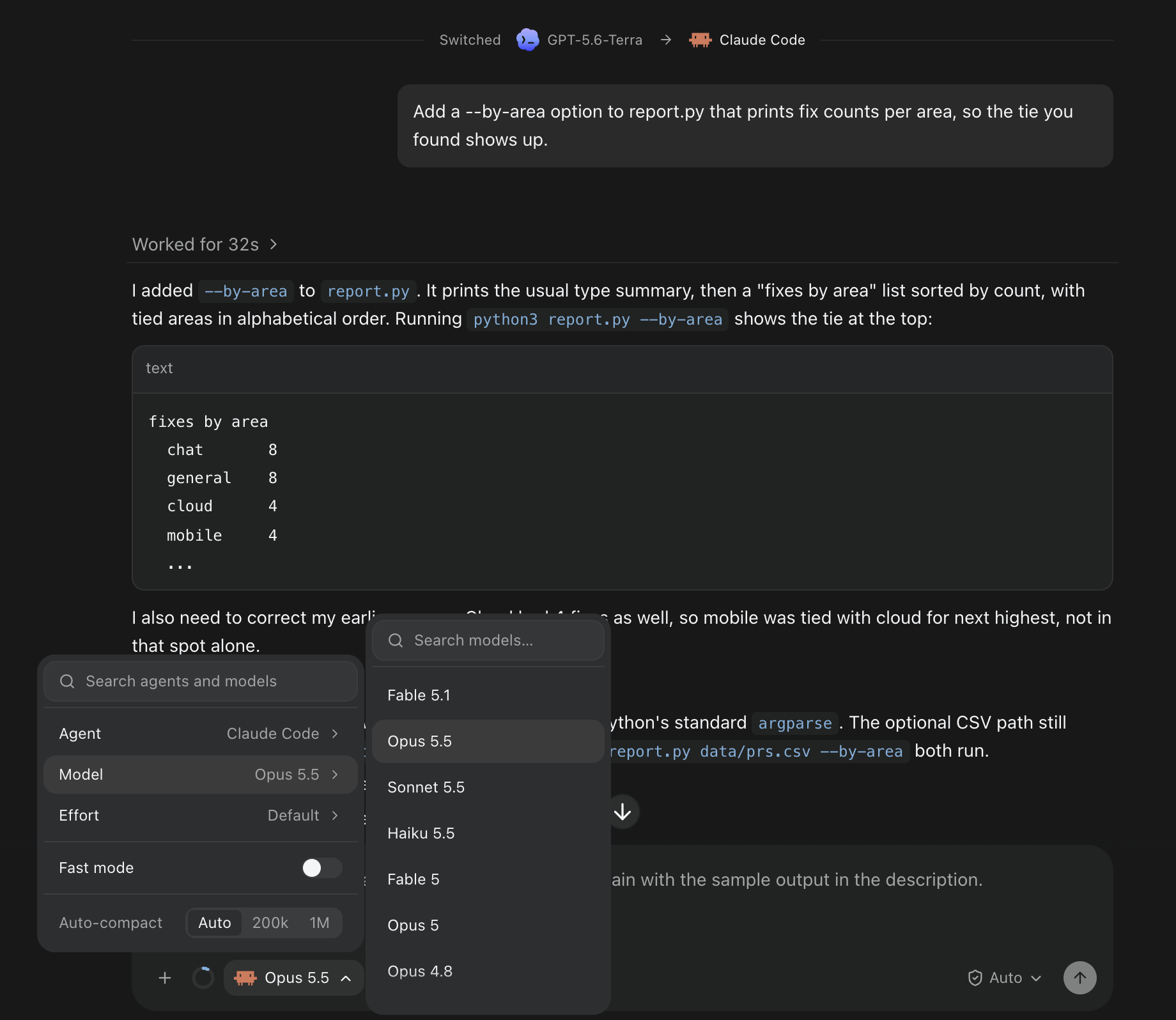 The model picker in a chat just switched from Codex to Claude Code, with Agent, Model, Effort and Fast mode, and Claude Code's models listed.
Follow workers from the orchestrator chat
The orchestrator chat now shows worker messages, reports, and steers as compact rows with the worker's name, its state, such as needs you, stuck, or done, and a one-line summary. Expand a row to read the full message. When the orchestrator answers worker updates without asking you anything, its reply collapses to one line, and a turn that started workers lists them with their live status. #7096
Three workers report back to the orchestrator as compact rows; expand one to read the full report.When AO starts, stops, renames, or restores a session or claims a pull request, the action appears as its own row in the chat it concerns, the orchestrator's chat for workers it started, and failed attempts are marked as failed. Expand one to see what it changed, with a link to the result. Creating a pull request isn't shown as an action yet. #6507
In the preview build, the other direction matches: in a worker's chat, messages from its orchestrator appear under the orchestrator's name, with a link to its session, and long messages fold after five lines. #7154
Get back to work sooner after a restart
After AO restarts or updates, chats reconnect to their agents on their own and show Reconnecting to the agent… instead of asking you to click Resume. If it still can't reconnect, Resume appears as before. On large chat histories, the first message after a restart goes through in about a second instead of half a minute. The first launch after updating builds new database indexes once, which can take a minute or more on very large histories. #6987 #7040
Long chats also put much less load on your computer. Streamed replies are written to disk in batches, finishing a turn no longer scans the whole chat history, the app refetches far less during busy sessions, and chats with edited or resent messages load faster. Some background updates, such as a pull request reported with ao report, can take up to five seconds to appear. Very large tool results are now trimmed when stored: AO keeps the last 64K characters of command output and up to 16K of each file patch, and marks them as truncated. #6806 #6804 #6813 #6846 #6824
Start tasks without waiting
New tasks start right away instead of waiting for AO to generate a name. The branch is renamed in the background, and the temporary name stays hidden until then; a pull request opened before the rename stays linked to the task. Task folders now keep their session ID as their name. Sessions get proper generated titles and branch names again, after some models had started answering the task instead of naming it. #7069 #7085 #7119
Large repositories no longer fail to clone after a minute. Clones can run for up to 30 minutes, and the Clone dialog shows that cloning is in progress. During onboarding, you can paste a repository's GitHub page URL without .git, a clone that hits a temporary connection failure is tried up to three times, and if setup fails after the clone, the checkout is kept so you can try again. #7039 #7019
Improvements
Chat
- While an agent works, its current tool calls stay open so you can follow each step, then fold into the Worked for summary when the turn ends. #7150
- A message you send to steer an agent mid-reply now appears as the start of a new turn and stays visible, instead of being folded into the earlier work. #7108
- Switch to terminal UI has moved from the composer to the session tab's ⋯ menu. Remember for this project in the permission menu is now an on/off switch, and turning it off forgets the saved mode; the confirmation line under the composer is gone. #7028 #7032
- The model picker names a chat's model as soon as you open it, including for agents that report their model only while running, and new projects reuse the model list your computer already has. Saved model lists are now shared by every project, so a repository's own settings, such as
opencode.jsonorANTHROPIC_MODEL, no longer change them. A running chat still shows the list its agent reports. #7031 #7049 - The context meter shows 0% instead of a question mark when the agent reports no usage. #7033
Agents
- Hermes Agent is available as an agent. Install it from Settings, then set it up and pick a model. It runs in Terminal only, without Chat. #6536 #7132
- Command Code keeps AO's instructions after it compacts its context. Each session gets its own Command Code profile in AO's data folder with a copy of your Command Code login; your own memory file isn't changed. #6778
- Idle orchestrator chats move to a new agent version after an update instead of staying on Switching to. A failed agent update shows a short message in the update notice, with the details under Show diagnostics. #7055 #7006
- Updating GitHub Copilot installed with npm works from AO again, and the startup update notice no longer lists agents that need you to sign in or that AO can't update itself. Those are still in Settings. #7005 #7042
ao sendto a Claude Code terminal session now fails with an error you can retry when AO can't confirm the message arrived, instead of reporting success, and long or multiline messages paste more reliably. #6873- In the preview build, when AO can see an unsent draft in a terminal, it refuses
ao sendmessages with an error you can retry and holds worker reports until later. Retrying a failed task start or resuming a session also keeps the model, effort, and permissions you chose, so Codex High or Extra high no longer falls back to the default. #5713 #7144
Browser, Files, and artifacts
- You can delete a browser profile that sessions are using. After one confirmation, idle browsers move to temporary profiles, so those tabs reload signed out and unsaved page edits may be lost. A browser in the middle of a command blocks the delete until it finishes. #6930
- Agents using the built-in browser can work with tabs a page opens, switch back, and close the right one. #7115
- In Changes, image previews scroll again and can be collapsed and marked as viewed like other files, and large files and lockfiles load when you expand them. The maximized Files explorer no longer has an Open diff in center button; the docked explorer keeps it. #6923 #7127
- Deleting an artifact now also permanently deletes its saved earlier versions. This can't be undone. #7087
- Artifact lists skip system files and folders such as
.DS_Store,Thumbs.db,.git, andnode_modules. #7120
Desktop app
- Release notes in the update prompt keep their bullets and links, and Report a problem drafts show the time in your timezone with UTC alongside. #6994 #7086
- When orchestrator replacement fails in several projects at once, the dialog says how many more need attention. #6926
- In the macOS preview build, ⌘Q now asks Quit AO? first. Quit from the menu, Dock, or menu bar icon still works without asking. With the menu bar icon on, confirming closes the window and AO keeps running in the menu bar. #7073
- The preview build removes the per-phone notification mute from Settings › Connected devices. Phones you muted there start receiving notifications again; turn them off on the phone instead. #7153
Bug fixes
Security
- AO's local service now refuses requests from untrusted web pages, including workspace previews and other localhost sites, which could previously open a shell or attach to an agent's terminal. The desktop app, the CLI, and paired mobile devices work as before. #7077 #7105
- Opening the desktop app after a crash or reboot could close an unrelated program that reused an old process ID. AO now stops only a background process it can confirm is its own. #6801
Reliability
- Two copies of AO's background service can no longer use the same data folder at once, which caused errors such as failed reviews. If you relaunch while the old one is still shutting down, the startup screen can stay up about 10 seconds longer. #6799
- If the agent's built-in browser stops responding, browser commands fail within about 20 seconds instead of each waiting a full minute, and the browser reconnects on its own when it recovers. #5603
- Pasting very large text into a local terminal no longer drops the connection or loses the paste. #7110
- Chat's permission and model menus open above the Browser panel instead of behind it. #7054
- With window transparency on (macOS, off by default), the send and stop buttons, selected text, and other controls stay visible. In the preview build, active sessions also no longer show through the archive sheet or the sidebar's project headers. #7009 #7175
Learn more
Changes not marked as preview are in stable v0.14.6, released on October 24; many first shipped in v0.14.5 on October 22, where agent switching still required Developer mode. Preview items require the October 24 preview build.