
v0.14.10: Orchestrator Cloud for everyone, a new sidebar, and automation templates
Orchestrator v0.14.10 opens Orchestrator Cloud to everyone, redesigns the sidebar with pinned projects and a lighter theme, and adds automation templates, public share links and Hermes Agent. The preview build lets anyone switch Claude Code and Codex accounts.
Stable v0.14.10 is out, and Orchestrator Cloud is open to everyone: sign in and your agents run in their own hosted workspaces instead of on your computer. The sidebar is redesigned and lets you pin projects, the light theme is lighter, Automations start from ready-made templates, and any file your agent makes can be shared as a public link. In the preview build, anyone can add more than one Claude Code or Codex account and move work to another account when one hits its limit.
Orchestrator Cloud for everyone
Your agents no longer need your computer. In Orchestrator Cloud, every task gets its own hosted workspace with your repository already cloned, so you can:
- Close your laptop and keep shipping. Cloud agents keep working while your computer sleeps, and their sessions show up on any computer where you're signed in.
- Run more agents than your machine can handle. Each agent builds, tests and runs your project in its own workspace, so several can work at once, up to your plan's limit, without slowing down your computer.
- Go from task to pull request in the cloud. Agents open pull requests, fix failing CI and review changes from their workspace. Nothing is cloned or installed on your machine.
Cloud no longer needs Developer mode. Choose Sign in to cloud at the bottom of the sidebar, then Clone to the cloud on the home screen. Settings also opens faster, because its requests no longer wait behind live updates. #7615
Clone a GitHub repository to the cloud and start three tasks at once. Each Claude Code agent works in its own hosted workspace, and a few minutes later all three have opened draft pull requests. The video is sped up while the agents work.A new sidebar, with pinned projects
The left sidebar is redesigned. Session rows stay quiet until something needs you: a spinner while the agent works, an alert when it needs input or when CI or a review needs attention, and a pull request or merged icon. Scratchpad sessions show the same status as project sessions. Projects show the avatar of their repository's owner, which you can turn off under Settings › General › Appearance › Repository avatars. #7365 #7819
Keep the projects you use most at the top: choose Pin to top from a project's right-click or ⋯ menu, and Unpin to put it back. #7752
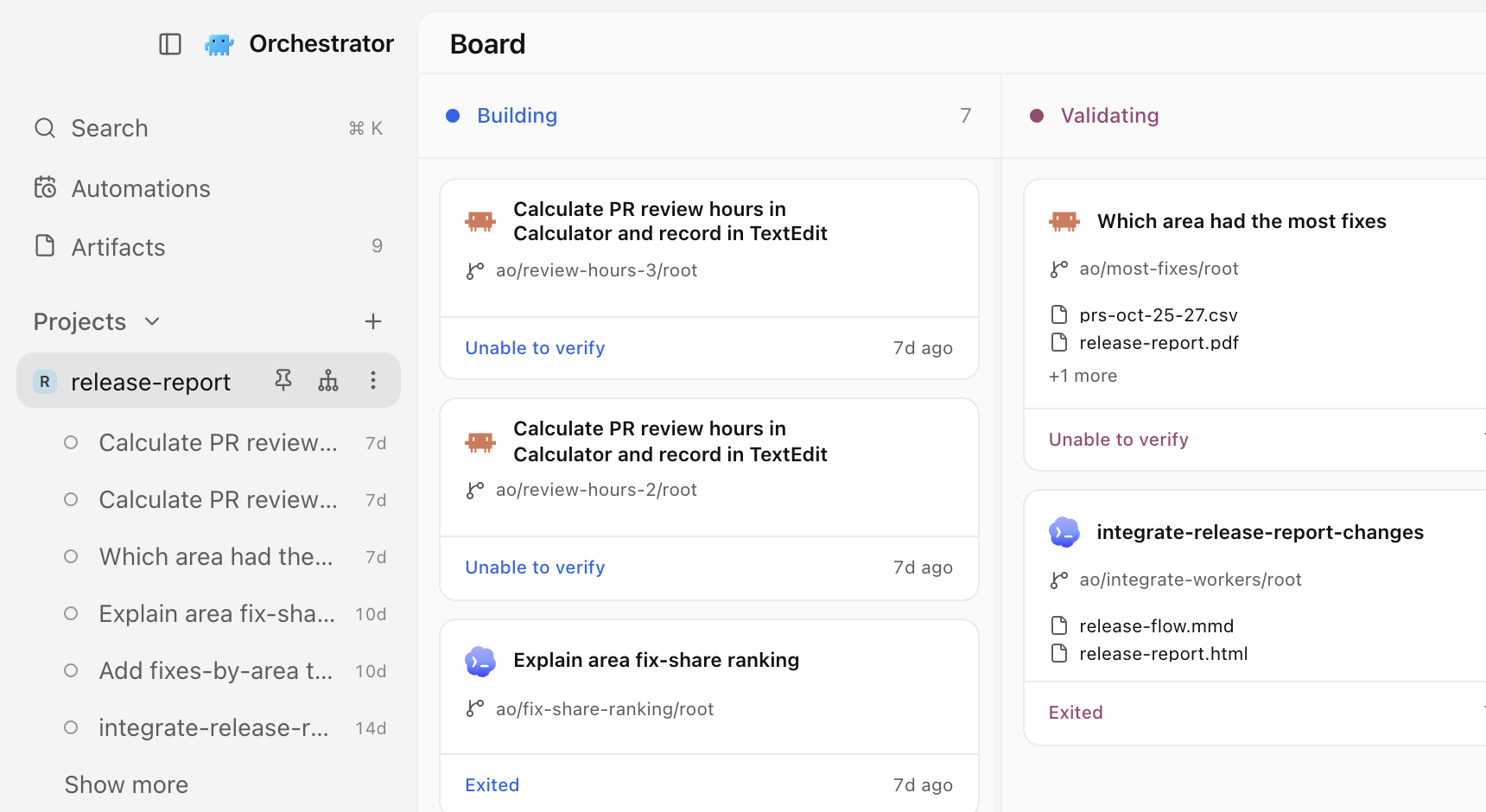 The redesigned sidebar with the release-report project pinned to the top, its sessions listed below it, and the project's board beside it.
The default light theme is lighter and cleaner. On macOS the window is now translucent by default, unless you turned Window transparency off before, and light mode with transparency looks like a native light app. Switching themes applies instantly. #7807 #7862 #7647
Start an automation from a template
The Automations page now opens with three starter templates: PR review inbox, Daily issue triage, and Weekly release notes. Pick one and the Create automation dialog opens with its name, prompt, and schedule filled in, for example weekdays for the PR review inbox. Change anything you like; nothing is saved until you choose Create automation. The templates ask your agent for read-only GitHub reports and need GitHub read access for the selected project. #6800
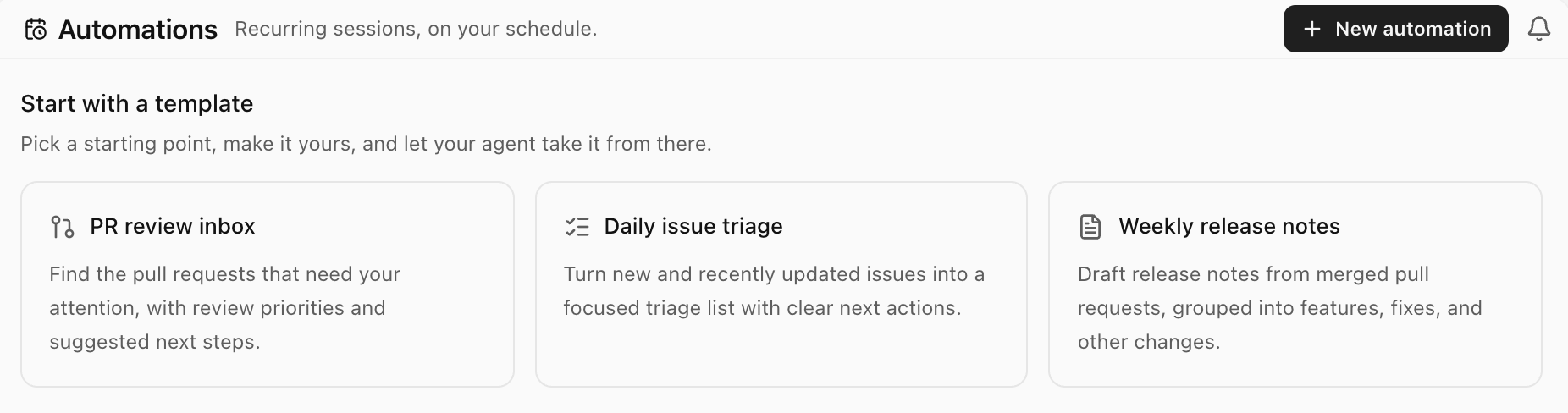 The Automations page with three starter templates: PR review inbox, Daily issue triage, and Weekly release notes.
Share a file with a public link
Send people what your agent made, not a file to download. Open a file from a session, such as a plan or a diagram, choose Share, then Publish, and copy the link: anyone with it can read the page on orchestrator.inc, with no app or account. When the file changes, Share offers Republish, which updates the same link, and Unpublish takes the page down. Publishing needs you signed in to Orchestrator Cloud. The free plan has 3 active links at a time, and paid plans have no limit. Orchestrator warns you before you publish a file that looks like it holds a credential, and videos can't be shared. #7479 #7758
An agent in Orchestrator writes a one-page launch plan, and Share, Publish and Copy link put it on a public page. Select a line and send feedback, the agent updates the plan, and Republish keeps the same link.Improvements
Sessions and sidebar
- The session preview card stays open while you move the pointer to it, even diagonally across other rows. #7828
- In the preview build, the orchestrator buttons in the sidebar and the top bar show a dot when the orchestrator has replied and you haven't looked yet, and a soft pulse while it works. #7969
- In the preview build, when an agent merges, closes, creates, or pushes to a pull request, the session's pull request status updates within a few seconds instead of at the next check. #7964
Chat
- Long messages you send fold to about ten lines, with Show more and Show less. #7784
- A message that never got an answer, for example after a dropped remote connection, no longer locks the composer. It moves to a Not sent strip with Retry and Discard, and Discard can be undone for five seconds. #7751
- Right-click a file path in chat to open it in Orchestrator, copy it, reveal it in Finder or your file manager, or open it in one of your installed editors. #6927
- The permission button in the composer has a dropdown caret, and its shield turns amber when you choose Bypass permissions, so you can see at a glance that the agent won't ask before acting. #7742
- Every finished turn starts with "Worked for", including quick answers, and the chat no longer jumps when the turn ends. #7806
- Editing a message shows one line, "Starts a new conversation branch. Files stay as they are.", instead of a longer notice. #7835
- The scroll rail beside a long chat is calmer, and the marker for the message on screen is longer and brighter, so you can see where you are. #7736
- Picking a model, agent, or effort in the composer menu closes only that submenu, so you can adjust the next setting. #7715
- Composer controls are slightly larger, reply actions keep their place on every reply, there's no blank gap under your messages, and buttons across the app share one hover style. #7743 #7735 #7733 #7710
- In the preview build, tool calls to MCP servers read in plain words, such as "Previewed the page", "Clicked", or "Pressed ⌘S", instead of raw tool names. #7956
- In the preview build, Orchestrator no longer opens the Browser by itself when a finished reply contains a link. Clicking the link still opens it. #7946
Artifacts
- An artifact you have open refreshes by itself when its file changes. #7662
- In the preview build, the artifact viewer zooms and pans: pinch, use the zoom controls, or press ⌘ = , ⌘ − and ⌘ 0 (Ctrl on Windows and Linux). Edit, feedback, history, and file actions moved into the file name's menu, which also has Open in browser. #7814
- In the preview build, image, PDF, video, and audio artifacts have version history: open History, preview an earlier version, then restore it or go back to the current one. #7875
Agents
- Hermes Agent is supported, in chat or in a terminal. Install Hermes, then pick it like any other agent, or run
ao spawn --harness hermes. In chat, Default asks before file edits, and Auto and Bypass permissions don't ask. #6635 - Quitting Orchestrator completely now stops the agents it started, so none keep running in the background. Their history and worktrees stay, ready to resume. Closing the window to the tray doesn't stop them. #7183
- In the preview build, anyone can add more than one Claude Code or Codex account. Under Settings › Harness › Claude Code or Codex › Account, add accounts, choose a default, and see each account's usage limits. The separate Subscriptions page is gone, and "No agent is ready" now takes you to Harness. Codex accounts added on the old Subscriptions page aren't carried over, so add them again there. #7899
- Also in the preview build, orchestrators have a Summary tab in the right panel, next to Browser. It shows the orchestrator's activity and the same account picker, so an orchestrator that hits its limit can keep going on another account. For Cloud orchestrators, Summary also lists their workers. #7978
- In the preview build on macOS, granting computer use permissions is guided: in Settings › Computer use agents, a small helper docks beside System Settings so you can drag CuaDriver into Accessibility and Screen Recording, and closes once both are granted. #7562
- In the preview build, a task can be up to 100 KiB, up from 16 KiB, so a long pasted brief no longer fails. #7298
Desktop
- Tooltips show the keyboard shortcut for their action, including shortcuts you changed, and obvious icons no longer have redundant tooltips. #7707
- In the preview build, the top bar's commands are in the macOS menu bar with their shortcuts: New Task, New Terminal, Open in Editor, Open in Finder, and Archive Session under File, the sidebar and inspector toggles under View, and a new Go menu with Back, Forward, Orchestrator, and Notifications. #7971
- In the preview build, right-click any tab in a session's tab strip for actions that fit it, such as Rename, Pin, Copy path, and Close tab. A tab's ⋮ menu lists the same actions. #7877 #7955
- In the preview build, Settings › General › Sessions › Terminal shell lets you pick the shell for new terminals on every platform: the system default, any detected shell, or a custom path. #7874
- In the preview build, the Clone a Git repository dialog shows live progress while cloning and says when it retries a dropped connection. #7860
- In the preview build, with no code editor installed, the top bar's open button and ⌘O open the worktree in Finder, File Explorer, or your file manager. #7880
- In the preview build, split panes let you keep a terminal or file beside the agent's chat. Turn on Developer mode and then Split panes, and drag a tab to an edge of the center panel. Toggle diff on macOS moves from ⌘⇧D to ⌥⇧D for everyone. #7791
Remote hosts and Cloud
- In the preview build, chats on a remote host open in under a second instead of up to 20 seconds over a slow connection, and recently read chats stay readable while the host is offline. #7789
- In the preview build, reopening a Cloud chat shows the conversation right away instead of an empty new-chat screen. #7935
- In the preview build, Cloud model pickers list only the models Cloud can run, and a new Cloud task defaults to its orchestrator's model. #7815 #7896
- In the preview build, links in a Cloud session's chat open in that session's Browser tab. #7933
Developer mode previews
These need Settings › General › Advanced › Developer mode.
- On macOS, dictate into the composer: click the mic next to send, speak, and your words stream into the message. Orchestrator asks for Microphone and Speech Recognition access the first time. #7611 #7732
- Start Claude Code, Codex, or another agent in a terminal tab and the tab takes its logo and name, with a spinner while it works, an alert when it needs you, and a dot when it finished in the background. #7787
- A simplified top bar floats above the center panel, with fewer controls and pill-shaped tabs. Turn it off with Simplified top bar. #7708
- Side chats, turned on with Side chats, are named from your first message and have a shorter description. #7616 #7675
CLI
- In the preview build,
ao session claim-praccepts pull requests on a repository that was renamed or transferred on GitHub. #7951
Bug fixes
Chat
- A crashed turn keeps showing that it failed after the chat resumes, instead of saying you interrupted it. #7589
- A message you steered into a running turn no longer comes back as recovered from an earlier session after a Claude chat restarts. #7817
- The Plan card shows one current plan, and a stopped turn's unfinished step stops spinning. #7413
- You can add an agent's message to chat even when it arrived outside a turn, such as after a background task. #6629
- Long tool labels, such as full file paths, are shortened inside the chat column and show in full on hover. #7809
- The orange indicator next to the model picker no longer appears for ordinary model names. #7709
- HTML and Markdown that agents produce open in the Browser panel instead of being refused, and HTML files and artifacts have a button to open them there. #7590
- In the preview build, agents can preview HTML pages again before showing them in chat. #7920
- In the preview build, an archived chat offers Restore session, which brings its worktree back and continues the same conversation, instead of a Resume agent that failed. #7898
- In the preview build, Claude Code chats keep their full slash-command menu, including your skills and plugin commands, after Orchestrator restarts. #7892
- In the preview build, Open in external browser works for HTML artifact cards instead of showing an error page. #7891
Sessions and pull requests
- Pull requests with cancelled or re-run checks no longer show Checks failing when GitHub shows them passing. In the preview build, checks cancelled by a newer push show as pending, and checks you cancelled show as cancelled. #7831 #8000
- Terminal orchestrators come back stopped and ready to resume after a crash, quit, restart, or update, instead of disappearing. #7818
- The session preview card no longer covers the archive confirmation. #7829
- A valid branch name is no longer reported as invalid when a branch check is interrupted. #7574
- In the preview build, deleting old archived sessions no longer freezes the app, and chats with edited or retried turns can be deleted too. #7928
- In the preview build, the inspector stops offering Create PR once the session's pull request is merged, until you push new commits. #7934
- In the preview build, a session shows the working spinner when Claude keeps working on its own after a turn. #7953
- In the preview build, workers started with
ao spawnopen like tasks from New task, with their prompt and setup steps, instead of showing as stopped. #7957 - In the preview build, projects whose repository was renamed or transferred on GitHub show their real avatar. #7947
- In the preview build, the session hover card works again after you rename a session from its right-click menu. #7894
Agents and sign-in
- After you sign in to Claude Code, the login terminal closes and new tasks start right away. #7853
- Claude Code tasks start when your saved login expired but can still be renewed, instead of being refused. #6738
- The Claude model picker no longer fails to load models when a saved account is signed in, and no longer lists Opus 5.5 twice. #7774 #7370
- Signing in to a Codex account uses the same Codex as your sessions, so a broken Codex elsewhere on your system no longer breaks it. #7577
- Kimi starts with permission modes it supports, and the picker shows only those. #7593
- On Intel Macs, Claude Code chats no longer fail to start because of the bundled Node. #7676
- A new OpenCode 2 session no longer fails when an old file disappears during setup. #7716
- In the preview build, OpenCode chats start and resume in workspaces with worktrees inside them, and a failed OpenCode 2 compaction shows as failed. #7559 #7869
Desktop
- On macOS, Restart & install finishes updating instead of stopping because the app was still running, and a stuck update offer clears itself. #7620 #7557
- On macOS, the Stay Awake button responds right away and resumes by itself after a low-battery pause once you charge. In the preview build, it stays in sync with Keep this Mac awake in Settings. #7686 #7870
- New fish shells in terminals start without a 2-second wait. #7864
- The Browser no longer opens by itself when you switch sessions, and it gets through Cloudflare and Google sign-in checks. The first browser profile you add becomes the default. #7861 #7728 #7565
- ⌘T opens a terminal in sessions on a remote machine, and remote host badges fit narrow sidebars. #7683 #7717
- Back in the top bar and the back shortcut close Settings and return you where you were. #7746
- Open in editor no longer lists Cursor when only the Cursor Agent command-line tool is installed, and launch failures show as a notification. #7730
- The window's right edge no longer opens the inspector by accident; use the toolbar button or shortcut. #7741
- File tabs keep their icon after you click them. #7537
- On macOS, menus no longer make the window shift, the title bar strip matches the sidebar's width, and the startup screen matches the app's background. #7749 #7768 #7772
- The Windows installer, macOS repair installer, and Linux package all use the Orchestrator name. #7578
- In the preview build, scroll edges fade cleanly with window transparency and in every theme. #7893
- In the preview build on Windows at 125% display scaling, the mobile pairing QR code draws correctly so phones can scan it. #7949
Learn more
Changes not marked as preview are in stable v0.14.10, released on November 6. Preview items require the November 8 preview build.