
v0.15.1: bring your chats over, share with your team, and a native mobile app
Orchestrator v0.15.1 imports your earlier Claude Code and Codex chats, shares Cloud sessions and projects with people and teams, puts every artifact in one list with one-click Publish, and ships a native mobile app with Orchestrator Cloud. The preview build adds forking a session and rolling back files.
Stable v0.15.1 is out. It follows v0.15.0 from November 13 with one fix, so this entry covers both. You can now bring the chats you already had with Claude Code or Codex into Orchestrator, share Cloud sessions and projects with your team, and find every artifact in one list with one-click Publish. Orchestrator for iOS and Android is rebuilt with native controls and runs Orchestrator Cloud sessions from your phone. In the preview build, you can fork a session at any turn and roll back the files along with the chat.
Bring your earlier chats into Orchestrator
Chats you already had with Claude Code or Codex on this computer can now come into Orchestrator, so you keep going where you left off instead of starting over. Start from Bring your earlier chats into Orchestrator on Home, Import chats… in project settings, the offer on an empty project board, or Settings › Harness for a single chat. On a Mac, import also finds Claude Code and Codex chats kept by another desktop coding app, including archived workspaces, and your agent can move that app's project settings over when you ask. Long import lists scroll, and import errors show next to Import. #6364 #8059 #8185
An empty project finds four earlier chats in its folder. Review them, leave one out, import the other three, then open an imported Claude Code chat and keep going: the agent still has the earlier conversation.Share Cloud sessions and projects with your team
Orchestrator Cloud sessions and projects can now be shared with people and teams, not only by link. Share opens one dialog: add people by name or email, or a whole team, choose their access, and see who has access and why, from the owner down to teams and invited emails. General access says in one sentence who a link lets in. Links start at Can watch, Can write asks first, and Link settings sets how long new links last and revokes old ones. Settings › Teams lists your teams, where you can rename them, manage members and see what's shared with them. #7511 #7888
In a Cloud session, Share is one button, and Cloud project settings have a Sharing page for the whole project. Files in another member's session are view only: you can open and read them, but not edit, delete, download or copy them. On a shared project's orchestrator, its pull requests and merge requests sit in a header control next to Share instead of floating over the conversation. #8124 #7665 #7810
Share a Cloud session with a team: add the team with Can watch access, then turn on link access and copy the link.One Artifacts list, and Publish in one click
The Artifacts page is now a single list, newest first, with each row naming its project and session. Filter by All, On this machine or Cloud, by project, type or sharing, switch to list view, or choose Select to delete several artifacts at once. Share is now Publish: one click publishes an artifact and shows its link, and when the file changes the button reads Republish and updates the same link. #8148 #8073 #8093
When a turn creates or edits an artifact, the chat shows a preview card under the reply, marked Created or Edited, and new artifacts open in the session's Artifacts tab instead of taking over the Browser. Lists now hold only the files an agent registers as deliverables with ao artifact add, so a page and its 50 images count as one artifact, and files an orchestrator writes show up too. #8120 #8174 #7855 #8118
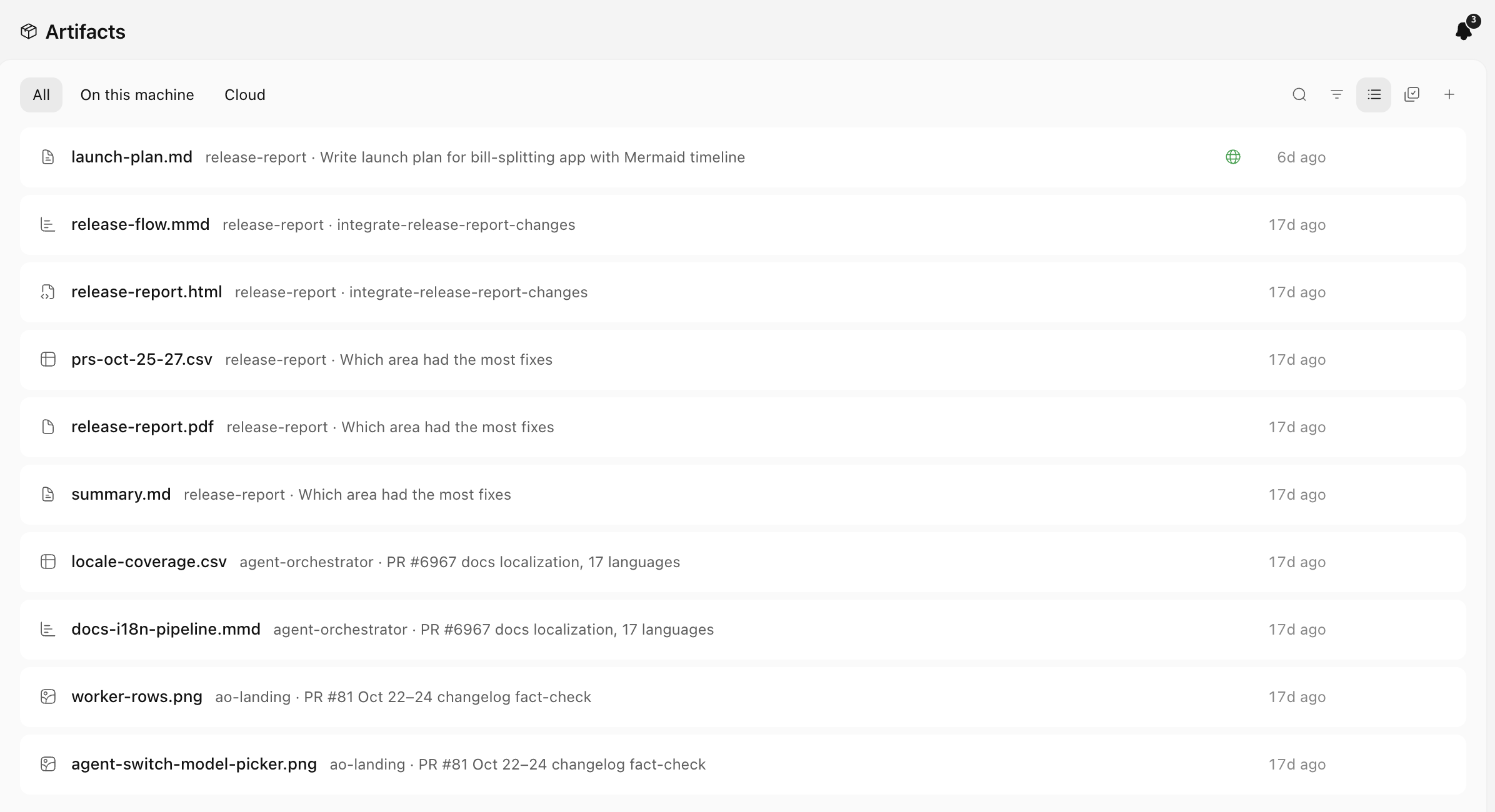 The Artifacts page as one list, newest first, with All, On this machine and Cloud filters. The published launch plan carries a globe mark.
A native mobile app, with Orchestrator Cloud on your phone
Orchestrator 2.4.0 for iOS and Android is rebuilt with native controls: tabs, the Workers board, New task, chat, Settings, Machines, the terminal, Files and previews. Sign in under Settings › Machines to start, chat with, rename, pin and stop Orchestrator Cloud sessions next to your paired computers, and connect Claude and ChatGPT to Cloud by signing in through your browser instead of copying a code. #7838 #7839 #8085 #8086
Pairing now uses a one-time code that works once within 10 minutes, so each phone or computer gets its own access that you can revoke on its own. In Connect mobile on the desktop, Regenerate is now Revoke all devices, and adding a remote host also accepts a pairing code. Version 2.4.0 is in the App Store and on Google Play. #8081 #8083 #8082
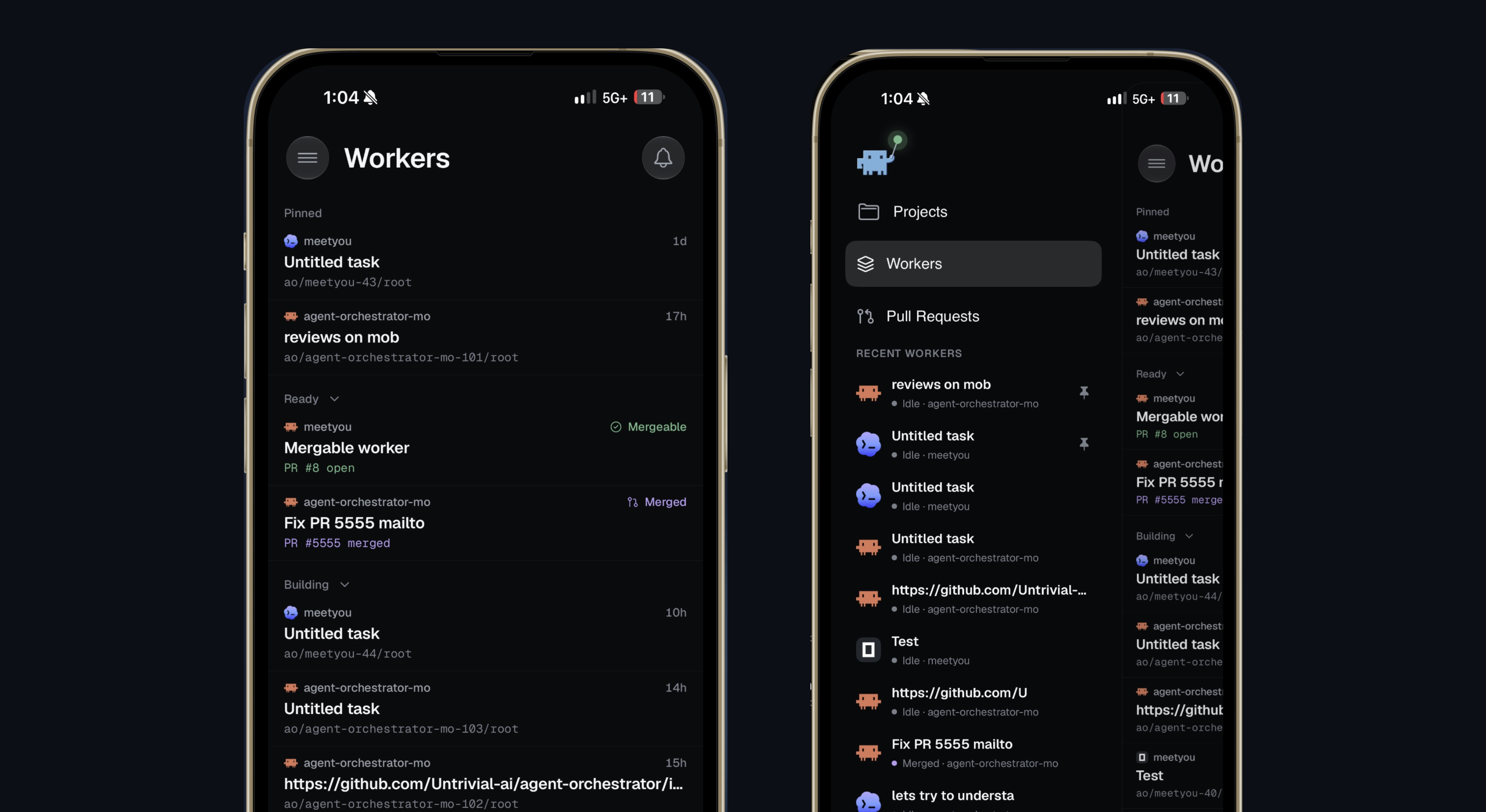 Orchestrator 2.4.0 on iPhone: the native Workers board, and the menu with Projects, Workers and Pull Requests.
Improvements
Now in stable
These were in last week's preview build and are now in stable v0.15.0.
- Add more than one Claude Code or Codex account under Settings › Harness › Claude Code or Codex › Account, choose a default, and see each account's usage limits. Orchestrators have a Summary tab with the same account picker, so one that hits its limit can keep going on another account. #7899 #7978
- The artifact viewer zooms and pans, and image, PDF, video and audio artifacts have version history you can preview and restore. #7814 #7875
- Tool calls to MCP servers read in plain words, such as "Previewed the page" or "Clicked", instead of raw tool names. #7956
- Chats on a remote host open in under a second and stay readable while the host is offline, and reopening a Cloud chat shows the conversation right away. #7789 #7935
- Settings › General › Sessions › Terminal shell picks the shell for new terminals. Right-click any tab in a session's tab strip for actions that fit it; its ⋮ menu lists the same rows. #7874 #7877 #7955
- The orchestrator buttons show a dot when the orchestrator has replied and you haven't looked yet. On macOS, the top bar's commands are also in the menu bar with their shortcuts. #7969 #7971
- The Clone a Git repository dialog shows live progress, and an archived chat offers Restore session instead of a Resume agent that failed. #7860 #7898
- A task can be up to 100 KiB, a pull request's status updates within seconds when its agent changes it, and cancelled checks no longer count as failing CI. #7298 #7964 #8000
Chat
- Find in chat (Cmd+F on macOS, Ctrl+F on Windows and Linux) searches the whole conversation, including messages that aren't loaded on screen, with a match counter and next and previous. You can change the shortcut in Settings › Shortcuts. #7684
- Chat steps say what each one did, such as "Read README.md", "Ran tests" or "Created branch feat/x", instead of "Ran command" for most things, and tool calls stay collapsed until you open them. Spawning, renaming and archiving agents fold into Worked for, and Agent Reports collapse into one line that counts reports and the ones that need you. #7840 #8052 #7822
- Agents no longer show Orchestrator's own CLI commands in the chat; steps read as what they did, such as "Previewed hello.html". #8156
- Your own messages render light markdown: lists, task boxes, bold and italic, code, links and quotes. In the composer, Shift+Return continues a list and Tab nests an item, and skills and files you send show in the accent color. #8064 #8062
- Editing a sent message happens in its own bubble, so nothing on the page moves, and attachments on a sent message show as one row of small tiles above the bubble. #7858 #8056
- Add to chat captures exactly what you selected, including formatted text, code and diagrams, and a selection in the diff viewer no longer disappears while the session is streaming. #7850 #7512
- A chat reopens where you left it in its history instead of jumping to the bottom, and chats that were idle come back faster. #8261 #8101
- Images in a page an agent shows in chat open at full size, and the chat image viewer uses the whole window. #7901
- Agents know your local time zone and give times in it instead of repeating UTC timestamps. #8152
- In the preview build, Roll back to here also restores the worktree files to how they were before that turn, and the confirmation lists every file that will change. You can also fork a session at any turn: Fork on a turn or Fork session in the session's menu starts a new session with its own worktree and the conversation up to that point. #7585 #8111
- In the preview build, selecting text in a chat opens an inline comment box, and numbered badges mark each annotated selection; the comments go to the agent next to the text they refer to. Add selection to chat can be rebound in the keyboard shortcuts window. #8340 #8435 #8284
- In the preview build, you can steer a running turn on Qwen Code, Kimchi, OMP, Antigravity and Hermes: a message sent mid-turn joins the turn instead of waiting in the queue. #7702 #8016 #8022
- In the preview build, when a message fails because the agent is signed out, a band above the chat box offers Log in, and your message sends once you're signed in. #7769
- In the preview build, the / and @ menus are compact, skills show by a readable name with a one-line description, and web links show the site's favicon. #8313 #8409 #8332
- In the preview build, Resolve conflicts and Update from base show in the chat as your own action, with the conflicting files listed. #8404
Sessions and sidebar
- The board's Archive opens a searchable archive over the page you're on: type to filter by title, branch, PR number, project or agent, and use the arrow keys to move. A project's ⋮ menu in the sidebar also has Archive. #8065 #8092 #8133 #8234
- Kanban statuses match what is happening: Orchestrator's own reviews stay in Validating, In review holds only PRs waiting on a person, and Ready holds only PRs that can merge. #7503
- Terminal sessions and shell tabs take the title their program sets, so a tab running Claude Code or Codex reads the task topic. Names you set yourself still win. #8018
- The sidebar footer is one row: your account on the left, and a Mobile menu (Connect mobile, Stay Awake) and Settings on the right. #8161
- In the preview build, Cmd+K searches every past session and opens one scrolled to the matching message, and agents can run the same search with
ao search. Cmd+K also opens shorter, focused on the current project or session. #7362 #8410 - In the preview build, the sidebar's Scratchpad section is called Sessions and sits above Projects, always with its + button, and the archive is labelled Archived sessions everywhere. #8323 #8318 #8294
- In the preview build, session cards show a branch by its topic, removing a project takes it out of the sidebar right away, and starting a review keeps you on your current tab. #8301 #8275 #8347
Artifacts
- The Summary tab previews your newest artifacts as thumbnails, lists the rest newest first, and a worker's inspector always shows its Artifacts tab when it has artifacts. #8044 #8032 #8011
- After you publish an artifact, your agent can find its public link, for example to add it to a pull request. On mobile, a published artifact shows its link with Share link and Copy link. #7966 #8028
- Video artifacts show a preview frame instead of a grey placeholder, and gallery previews load faster after the first view. #7671 #8071
- The artifact preview window has a slimmer header, and Scratchpad files can be shared from it. #8043
- In the preview build, the publish panel opens at once, every list marks a link as public or restricted, and a changed published artifact shows a single Republish button in its header. #8302 #8349
- In the preview build, the Artifacts page and a session's Artifacts tab stay fast with hundreds of artifacts. #8339
Desktop
- The new tab bar is on for everyone: pill-shaped tabs, a + for a new terminal after the last tab, and a quieter set of actions. The session tab always shows its ⋮ menu, and middle-click closes terminal and file tabs. #8077 #8079
- Clicks in the terminal reach programs that use the mouse, such as Claude Code's panels. Hold Option (Shift off macOS) to select text, or choose Settings › General › Terminal clicks › Always select text. Terminal tabs show the agent running in them with its live status. #8141 #8276
- The Automations page is redesigned: starters stay at the top, and your list gets All, Enabled and Paused filters with counts, search, a project filter and sorting. Schedules read in plain language. #8088
- A new, consistent icon set and control style across the app, and a redrawn app icon with a Liquid Glass version on macOS 26. #7903 #7999 #7970 #8069
- The update row in the sidebar shows download progress, links to the release notes, and offers a retry when an update fails. The app also opens faster, without waiting on a network check. #8020 #8165
- The app, its CLI help, agent prompts, error messages and the tray use the Orchestrator name throughout, in all nine languages. #7685
- In the preview build, Report a problem opens a chat with an agent that writes the bug report with you, instead of a form. #6984
- In the preview build, idle Browser tabs of sessions you aren't looking at are throttled, leftover temporary browser profiles are cleaned up, and
ao-app://sessions/<project>/<session>links open the app on that session. #8400 #8407 #8047
Agents and accounts
- New Claude Code reviews run in Chat when it's available, and that reviewer is read-only, so it can't write to the worker's branch. #7253
- The account chip in the composer shows when you're near a usage limit, and limits now show how much you've used, for example "Session 78% used". #8231 #8272
- In project settings, each agent row reads Agent · Model · Effort, with reasoning effort in its own picker. If a terminal runs a different
aothan the app's own CLI, Settings › General › Advanced says so and Use this app's ao fixes it. #7952 #7783 #8039 - In the preview build, Claude Code and Codex Chat sessions can move to another signed-in account when they hit a usage limit: turn on Move to another account at a usage limit in the agent's Account settings. #7534
- In the preview build, subscription accounts work on remote hosts, with an Account row in the agent picker, and
ao accountlists and switches accounts. #8253 #8355 - In the preview build, each agent's Account tab lists sign-in methods and API keys separately, saves a provider API key once and checks it, and explains a failed account check in plain words. #7312 #8365
- In the preview build, Grok Build can run as a Chat session, with model and effort controls, permission prompts and session continuation. #8298 #8278
Remote hosts and Cloud
- When a remote host is offline, its board keeps the last saved copy and shows Offline, when it was last updated, and Retry. #8222
- Remote host passwords are stored encrypted, and opening a host's tunnel address in a browser no longer locks your phone out. #8038 #8027
- In the preview build, Cloud sessions gain more of what local sessions have: archive from the tab menu, terminal Restore, shell tabs remembered across restarts, file tabs, automations, notifications and PR conflict handling. #8341
- In the preview build, the Share dialog drops its Workspace members row, and Share in an orchestrator session shares the whole project. #8307
Mobile app
- An artifact opens in a viewer you can swipe through, with a filmstrip of the session's artifacts, and the viewer previews video and audio, PDFs on Android, CSV and TSV tables, and Mermaid diagrams. A turn's artifacts show as preview tiles under the reply. #7681 #8098 #8235
- Files can compare against another branch or the PR, and show uncommitted, staged, unstaged or single-commit changes. #8224
- Add local projects to a paired computer from New project, and New task opens with the project you last worked in. #8240 #8140
- Android uses the same board layout as iOS, and Pull Requests is a grouped list with one status per PR. #8154 #8218
- Attached photos and files show as thumbnails in the composer, and pasting an image into New task attaches it. #8153 #8226
- A Workers board with nothing running shows an idle screen with Archive pinned and a New agent button. On an iPad with a hardware keyboard, Return sends and Cmd+Return steers a running turn. #7506 #7666
Developer mode previews
These need Settings › General › Advanced › Developer mode.
- A Usage page shows what your agent sessions cost, the tokens they used and how much of each subscription is left. Open it from Usage in the sidebar. #7148 #8097 #8112
- New projects can pick their worker and orchestrator agents for you, starting with an installed, signed-in agent. #8252
- /btw opens a side chat on very long conversations instead of failing. #6599
- In the preview build, with PR view on, a pull request opens in its own tab beside the chat, with its description, comments, checks, reviewers and stack, plus Merge. #7394 #8336
- In the preview build, with Split panes on, every pane has a title bar you can drag, and agents can arrange your tabs with
ao pane. #8273 #7873 - In the preview build, in Chrome mode, agents can work in their Chrome tab while its window is covered or minimized. #8396
Bug fixes
Chat
- Claude chats recognize Claude Code's new usage-limit messages again, so they show the limit notice and resume when it resets instead of a generic error. #7991
- A chat waiting on a question no longer gets stuck after Orchestrator restarts. #7919
- When an agent stops mid-turn, the turn ends with "The agent stopped before this turn finished" instead of spinning forever. #8171
- Chat does much less work while an agent replies, so long conversations stay responsive, and switching sessions no longer freezes the sidebar. #7988 #8013
- Switching between chats no longer replays fade-ins and scrolling for content that was already there. #8067 #8233
- Steering a queued message moves it out of the queue at once, a steered message no longer seems to vanish, and attachments show in your message the moment you send it. #7963 #8049 #8184 #8063
- While a chat moves to another Claude account you can keep typing, and an expired Claude login asks you to log in again instead of showing a raw error. #7992 #7993
- Link hover cards finish loading within about 3 seconds, and a chat link to a file an agent saved as an artifact opens that artifact. #8001 #8045
- Review comments forwarded to the chat render GitHub's HTML instead of printing the tags, and the "Answered by … instead of …" row no longer appears for model aliases that resolve as expected. #8150 #8214
- Copy image, Save image and Open in Orchestrator Browser work in chats on a remote host. #8151 #8239
- In the preview build, messages sent in quick succession while the agent works are all sent, and messages queued behind a stalled turn run when it times out. #8248 #8297
- In the preview build, a chat whose Claude Code session was lost shows as exited and can be resumed, and Claude Chat shows the model's real context window from the first turn. #8195 #8041
- In the preview build, after switching a chat from Claude Code to Codex, the composer shows Codex's model. #7790 #8320
- In the preview build, orchestrator chats keep messages in order, the first message no longer jumps on macOS, and clicking into the Browser or a terminal no longer sends your typing to the chat box. #8384 #8324 #8418
- In the preview build, opening a session no longer flashes an error under the model picker, and OpenCode Go models stay selectable. #8394 #7307
Sessions and pull requests
- Starting a session is more reliable: setup gets up to 120 seconds, stale model settings can be reset, and automatic starts pause after three identical failures. #8119
- Claude Code sessions that compacted can switch from Terminal to Chat again, and a Hermes chat with messages can switch to Terminal. #8026 #7740
- You can unpin a remote host's session even when that host is offline. #8094
- In the preview build, an orchestrator acknowledges worker reports that Claude Code wraps as pasted content, so the same report no longer comes back. #6387
- In the preview build, a CI job that failed only because its run was cancelled counts as cancelled. #8149
Agents
- Auto review works again on tmux 3.5 and newer, and running a Claude Code review again with a new setting no longer fails. #7315 #8212
- Agents installed with npm, nvm, fnm or Volta no longer show "Installation check failed" when the app is opened from the Dock. #7922
- Codex with a custom model provider no longer shows as signed out. #7959
- With OpenCode 1, answering a prompt clears Needs You right away, and OpenCode subagents no longer take over their parent session. #7596 #7597
- Antigravity sessions respect the Auto and Accept edits permission modes, and Command Code sessions keep conditional git config behind a symlink. #8066 #8144
- In the preview build, Settings no longer lists the same Claude Code login twice. #7674
Desktop and remote hosts
- Cloning a GitHub repository from "Let's set up your first project" works again. #7927
- Update notes for a stable release show that release's own notes, and their links open in your browser. #8110 #8183
- The Browser panel no longer goes blank while a menu is open, and the maximized Browser runs edge to edge. #8173 #8074
- The center pane can no longer be pushed sideways, and archiving a session with uncommitted changes no longer leaves a cut-off error in the top bar. #8024 #8055
- Pasting into Find in terminal puts the text in the box, Add feedback works on a rendered HTML artifact, and Edit file opens again for Cloud artifacts. #7882 #8012 #8048
ao remote-host linkfalls back to a temporary tunnel address instead of failing. #7977- In the preview build, a remote host's chat box stays open while the host reconnects, and a failing file stream no longer leaves sessions stuck. #7431 #8304 #8176
- In the preview build, in Cloud Chat, the approval menu changes the approval mode, New Task lists Cloud's own models, and sending while scrolled up brings you to your message. #8287 #8288 #8292
- In the preview build, the bundled ACP Node runtime is updated to 22.23.5 for Node's security fixes. #8196
Mobile app
- The open chat stays on screen when you switch apps, switching between Chat and Terminal shows one loader, and Android scrolling is smoother. #7688 #7908 #7950
- Connect manually keeps the keyboard open on iOS and accepts a host with its own port. #7906 #7995
- A long approval command scrolls inside its card, the Android mic button no longer turns blank, and saving a machine's name no longer crashes on Android. #7797 #7887 #7943
- Machine renames sync without signing out, a multi-route Cloud machine no longer reconnects every 30 seconds, a Default-model task starts, and failed MCP servers show as a short note. #7990 #7794 #7996 #8037
Learn more
Changes not marked as preview are in stable v0.15.1, released on November 14, which builds on v0.15.0. Preview items require the November 14 preview build. The mobile app changes are in Orchestrator 2.4.0 for iOS and Android.