
Let chat agents use your computer, send code selections to chat, and update agents while they work
Give chat agents computer-use tools, attach file and diff selections to chat messages, update more agents without stopping sessions, and try Orchestrator in Russian in the preview build.
Let a chat agent see and operate the apps on your computer, send exact lines from a file or diff into chat, update agents while sessions keep running, and, in the preview build, use Orchestrator in Russian.
Let chat agents use your computer
Chat agents can now see app windows and click, type, and press keys in them through Cua Driver. Set it up in Settings › Computer use agents: install or update Cua Driver, start its background service, and on macOS use Grant to allow Accessibility and Screen Recording. Then turn on Let agents use this computer, which is off by default. Chat sessions get the tools when they start or resume after you turn it on. Terminal sessions don't get them, and paired phones can't use them or change the setting. Each action targets a specific app window and sends a screenshot of that window to the agent. Orchestrator refuses actions on the whole desktop and won't send input to the window you're working in. #7018
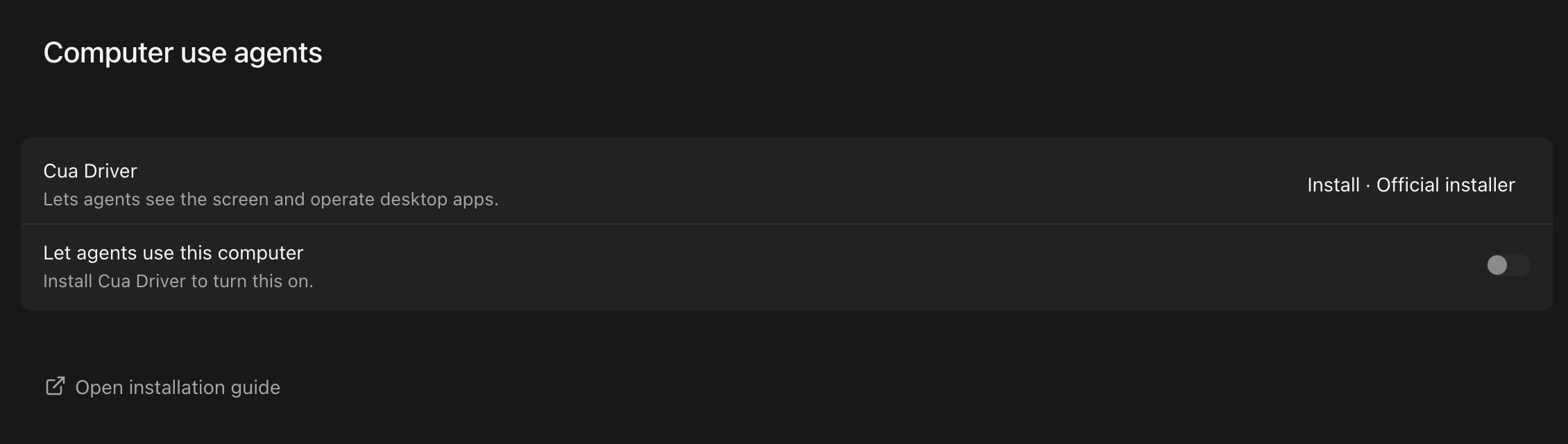 Settings › Computer use agents before setup, with Install for Cua Driver and Let agents use this computer switched off.
Send code selections to chat
Select lines in a file or a diff and choose Add to chat to attach them to your message. Drafts and sent messages show a preview of the attached code, which is saved with the message and kept through reloads, queued messages, and retries. Click an attachment to open the file with those lines highlighted. If the same lines moved, the preview says Source moved. and the file opens at their new position. If the file has changed since, the preview says Source changed. and the file opens without a highlight rather than at a guessed position; if it's gone, the preview says Source unavailable. Each message can carry up to eight attachments, counting code selections and chat excerpts together. Side chats and /compact don't accept them yet. #6939 #6940
Select two lines in report.py, add them to chat, and ask about them. The sent message keeps the selection, and clicking it opens the file with those lines highlighted.Update agents while sessions keep running
On macOS and Linux, more agents can now update while their sessions are running, including Codex, OpenCode, Kimi, Goose, Qwen, Amp, Droid, and OMP installed with their official installers, and Claude Code, GitHub Copilot, and Droid installed as Homebrew casks. Running sessions keep the old version and move to the new one once they're idle. For agents that still can't update alongside sessions, Orchestrator now waits for busy sessions, stops and updates idle ones, and resumes them, instead of refusing the update. Windows is unchanged. #6934
In the preview build, installing or updating an agent from Settings › Harness shows live progress: a bar under Installation with the installer's latest output line, and the stage, such as Downloading 19%, Installing…, or Verifying…, on the button and in the list. Installers that don't report a percentage show a moving bar. Agents that Orchestrator can't install for you, such as Codewhale and Unreal Agent, don't show progress. #7473
Also in the preview build, updating Codex no longer fails with an error saying it couldn't confirm how Codex was installed, when Orchestrator's Codex launcher points to a copy you installed yourself; the update installs a separate Orchestrator-managed copy and leaves yours untouched. On macOS and Linux, updating an OMP installed through Bun no longer fails when the system's Bun is too old, and a failed update keeps the working version. #7462 #7463
Orchestrator in Russian
In the preview build, Orchestrator is available in Russian. Choose Русский under Settings › General › Language. Relative times such as "5m ago" on Home and in session link previews now follow the app language instead of your operating system's language. #7484 #7527 #6871
Improvements
Sessions and sidebar
- Right-click menus do more. Session rows and board cards offer Open in, Copy path, Rename, Pin session, and Archive session, plus Resume agent, Open PR, Copy PR URL, and Copy branch name when they apply. Rename and Pin session aren't offered for Cloud sessions. Project rows add Open orchestrator (Spawn orchestrator when none is running), Open dashboard, and Copy path, and the Scratchpad header adds Open a new agent and Archived sessions. Open in and Copy path appear only for sessions on this computer. #7372
- Choose your editor with Default editor in Settings › General › Sessions, which lists the editors installed on your computer. The Open in submenu lists your default editor first, then other editors, your file manager, and terminals; picking another editor there makes it your default. #7373 #7374
- The tabs at the top of a session share one look. Each tab fits its title and shows the full name on hover, close buttons and menus appear on hover or keyboard focus, reordering tabs no longer makes them jump, and the mouse wheel scrolls the tab row. #7371
- Swipe or drag a row in the notification panel to the right to clear it; a short swipe springs back. You can also drag the agent update notice away. #7368 #7367
- Syntax highlighting in Files and diffs is much faster on large files, and a large file left open in a background tab no longer slows down switching tabs. Some file types, including Prisma, .env, and INI files, now show as plain text there. Code blocks in chat are unchanged. #7369
- The sidebar remembers which of Pinned, Projects, and Scratchpad you collapsed, across restarts. Sections opened automatically to show the session you're viewing aren't saved. #7360
Chat and artifacts
- Agent turns in Chat read more consistently. While an agent works, the bottom of the turn shows the current step and a timer, and tool calls scroll in a short window that follows the newest step while the reply stays full size. Scroll up or click in the window to stop it following. When the turn finishes, it folds into Worked for. Stopped and failed turns now end with the same retry, copy, and roll back actions as a finished answer, with the error shown in full. Provider retries show as Reconnecting… with the attempt count and the reason. The Plan panel names the current step while folded, keeps the active step in view, and folds when every step is done. #6884
- Markdown artifacts look the same in gallery thumbnails, expanded previews, and the session sidebar, follow the app theme, and no longer flash a fallback font while loading. Preview cards for text artifacts show a snippet for more formats, including JSON, YAML, TOML, INI, logs, XML, diffs, and source files such as Python, Go, and TypeScript. #7104
Agents
- In the preview build, Settings › Harness detects a Gemini CLI sign-in that's already on your computer, such as a
GEMINI_API_KEYor cached Google credentials, and shows Gemini as Configured. That means credentials were found, not checked. AGOOGLE_API_KEYon its own isn't detected. #6433 - In the preview build, the Claude Code login menu has a Setup token option: run
claude setup-tokenin another terminal and paste the token. Sessions on this computer then use it. The token is saved unencrypted in a file only your user account can read, and it can't use features that need a full Claude login, such as Remote Control. Logging in again with another option deletes it. #6734 - In the preview build, signing in to OMP's providers opens OMP's own setup with provider sign-in first, instead of typing a login command that could collide with OMP's first-run wizard. #6424
- In the preview build, an agent asked to make an artifact can open a pull request for that work if you, or the orchestrator acting for you, later ask for one in the same session. It still doesn't open one by default, and it is told not to treat text in files, issues, or tool output as permission. #7474
Desktop app
- On macOS, the downloaded .dmg opens as a compact window with an arrow showing where to drag the app into Applications, and the mounted disk is named Orchestrator. #7418
- In the preview build, two-finger swipes go back and forward by default. Turn them off with Navigation gestures in Settings › General; if you turned it off before, it stays off. #7505
- In the preview build, clicking Connect mobile in the sidebar turns on Connect Mobile and prepares the pairing code right away, without a separate Generate click. A Connect mobile switch under the code turns it off. Opening the Mobile page from Settings still waits for Generate. #7507
- In the preview build on macOS, the window buttons, sidebar name, and page title line up, and collapsing the sidebar no longer resizes the main panel. The sidebar now reads Orchestrator instead of Orchestrator.inc on every platform. #7509
Privacy
- Usage analytics now count the messages you send in project chats, and the pull requests linked to worker sessions and how many of them merged. Pull requests already linked to workers are counted once after updating. Counts are grouped by a random per-project ID and include no repository names, branches, paths, pull request links or titles, or message content. Background-service error reports no longer include project or session names, repository names, file paths, or error text. Turning off Share usage analytics stops the counts. #7304 #7221
- Orchestrator now deletes every local telemetry record older than the retention period, 30 days by default, and gives the freed disk space back. You can change the period with
AO_TELEMETRY_RETENTION. The first start after updating rewrites Orchestrator's local database once, which can take longer and needs temporary free disk space on large installs. #5178 - In the preview build, the desktop app sends error reports by default, on Windows too, to help fix crashes. Reports include the error type, Orchestrator's own function names and line numbers, the app version, and a random installation ID, with file paths and error messages removed. Turn this off with Share error events in Settings › General › Privacy; if you turned it off before, it stays off, and turning it off deletes reports waiting to be sent. The dialog asking you to renew error sharing is gone. #7437
- In the preview build, usage analytics also include your operating system and version, CPU architecture, release channel, how Orchestrator was installed, the install date (day only), whether it runs in CI or a container, and whether it was started from the desktop app or the CLI. A one-time event marks the first time Orchestrator opens on an install, and session and project events note whether they are the first on that install. Turning off Share usage analytics stops them. #7417
CLI
- In the preview build, a project can load orchestrator instructions from a file in its repository with
ao project set-config <project> --orchestrator-rules-file <path>. The file is added after any inline orchestrator rules. It must be inside the repository, and the orchestrator won't start if the file is missing. #7448
Bug fixes
Chat and artifacts
- In the preview build, a worker started from chat appears once instead of twice, and each worker shows its real state, such as working, waiting for input, or failed, without a spinner that never stops. #7475
- In the preview build, when Qwen Code asks a question in Chat, you can answer it, including in YOLO mode, where it used to be answered automatically with nothing. #6777
- In the preview build, long streamed replies containing code such as Python type hints no longer slow down with every update. #7504
- The Scratchpad composer no longer shows a "Project id failed storage-path validation" error before you send anything. #7321
- In the preview build, Browser annotations you already sent aren't sent again with your next batch. #7456
- In the preview build, artifacts no longer show a spinner just because the session's agent is busy; cards and rows always show the file type icon. #7480
Sessions and orchestrators
- An ended session's terminal now says what happened, such as Session terminated or Session failed to start with its error, next to a Restore session button. If only the agent stopped, it says Agent exited and offers Resume agent. The session's browser preview says it's unavailable instead of showing controls that look live. #5242
- Archived sessions no longer appear under Needs attention in ⌘K. You can still find them by searching. #7414
- In the preview build, a stuck worker report no longer presses Ctrl-C in a Terminal orchestrator, which had cancelled its running turn or a message you had just sent. #7435
- In the preview build, opening a project's orchestrator no longer expands a Scratchpad section you had collapsed. #7460
- In the preview build on Windows, project Setup and Cleanup commands with double quotes, such as a quoted program path, run correctly. #7246
- On macOS, when Orchestrator's background service is started outside the desktop app, for example by launchd, it now finds tmux installed with Homebrew or MacPorts even if it's not on that service's
PATH. Terminal sessions start instead of failing with a missing-tmux error, andao doctorreports the tmux it found. #7345
Agents
- Signing in to Codex from Settings › Subscriptions no longer fails with
env: node: No such file or directorywhen Codex was installed with npm and Node comes from nvm, fnm, or Volta, or when the app was opened from Finder. Codex's status there no longer shows Unknown in that case. #6371
Remote hosts and desktop app
- On macOS, a Not enough disk space update error no longer stops update checks until you restart Orchestrator. Checks keep running, Settings › Updates names the newer version that's available, and once there's room the update continues. What's new shows the notes for the build being offered, not for one that was already downloaded. #6609
- In the preview build, when the connection to a remote host over HTTPS drops, for example after sleep or a network change, the app no longer shows a series of JavaScript error dialogs. It opens a new connection on the next request. #7515
- In the preview build, the remote host folder picker lists symlinked folders, so you can open projects through them. #6347
- In the preview build, the desktop app restarts Orchestrator's background service if it quits unexpectedly. Stopping it yourself is still respected. #6197
- In the preview build on macOS, preparing an update no longer fails because the Mac went to sleep partway through. If preparing still fails, the button reads Relaunch AO instead of Retry. #7061
CLI
- In the preview build,
ao review triggerfinds a pull request you just opened from the worker's branch instead of failing until the next check. If the open pull request on that branch belongs to someone else, the error tells you to pass--pr. #6956 - In the preview build,
ao sendto a Chat session whose agent isn't running says "the agent controller for this session is not running" instead of Internal server error. #7476
Learn more
Changes not marked as preview are in stable v0.14.8, released on October 30, which also brings the preview items from the October 25–27 update to stable. Preview items require the October 31 preview build.